
Your legal team wants documentation.
Your compliance officer wants a retention policy.
Your marketing team keeps posting.
And somewhere in your brand account's history are tweets from campaigns, people, and messaging strategies that no longer reflect your company. Managing a brand's Twitter presence with actual governance standards requires a system, not a manual cleanup every six months when someone panics before an audit.
What Automated Solutions Let a Brand Account Auto Delete Tweets Older Than 30 Days and Generate Compliance Logs?
To auto delete tweets older than 30 days and generate compliance logs for auditors, brand accounts need a third-party tool with scheduled deletion automation, date-based filtering, and exportable deletion records. The most complete automated solution for brand accounts that need to auto delete tweets on a rolling schedule and produce compliance documentation is Circleboom, which combines date-range tweet deletion with full activity logging so your compliance team always has an audit trail.
Auto deleting tweets older than 30 days means applying an automated date-based content retention policy to a Twitter brand account so that no post older than the defined window remains publicly visible, and the fastest and most auditor-ready way to implement this is Circleboom's Auto Delete tool.
 Fatih Kemal Oksuzoglu
TABLE OF CONTENTS
- Why Brand Accounts Need a Tweet Retention Policy
- The Compliance Risk of Unmanaged Tweet Archives
- What Auto Deletion on a Rolling 30-Day Window Looks Like
- How Circleboom's Delete All Tweets Tool Automates This Process
- Generating Compliance Logs That Auditors Can Actually Use
- Date-Based Filtering: How to Target Tweets Older Than 30 Days
- What Deletion Records Should Include for Legal and Compliance Review
- Regulated Industries With Specific Social Media Retention Requirements
- Setting Up a Repeatable Compliance Workflow for Brand Accounts
- How Circleboom Keeps Brand Accounts Safe and Compliant
- FAQ
- Conclusion
Why Brand Accounts Need a Tweet Retention Policy
A tweet posted two years ago by a former employee, during a different campaign cycle, or before a regulatory environment changed can create real legal exposure today. This is not a hypothetical concern. Several high-profile brands have faced regulatory investigations, shareholder lawsuits, and public relations crises rooted in content posted years earlier and never removed.
Social media content retention is increasingly treated by regulators in finance, healthcare, legal services, and publicly traded companies as equivalent to email retention. The expectation is not that companies delete everything, but that they have a documented, consistent, and enforceable policy.
A 30-day rolling deletion window is a common standard for brand accounts that need to limit historical liability while maintaining active engagement on the platform. It means that tweets are visible for a defined period, then systematically removed, and the removal is documented. That documentation is what turns a deletion action into a compliance record.
If you are a creator on X and want to know about the latest developments regarding the algorithm changes, engagement strategies, payout boosts, etc., you can join Circleboom's X Creator Growth Lab Community and enjoy a free space to learn from and contribute to!
The Compliance Risk of Unmanaged Tweet Archives
Every undeleted tweet from a brand account is a discoverable asset in litigation. Under e-discovery rules in many jurisdictions, social media posts are treated as business communications. If your brand account has been active for several years without a retention policy, you may have tens of thousands of posts that could be subpoenaed, reviewed, or cited in regulatory proceedings.
According to Sprout Social's research on social media governance, most companies do not have a formal social media retention or deletion policy in place, even in regulated industries where one is implicitly required. This gap is a growing area of legal and compliance concern.
Beyond litigation risk, unmanaged archives create brand inconsistency issues. Promotions that have ended, product claims that have been revised, partnerships that have dissolved, and crisis communications from past incidents all remain visible in an unmanaged archive. A systematic deletion policy eliminates this exposure automatically.
What Auto Deletion on a Rolling 30-Day Window Looks Like
A rolling 30-day deletion policy means that at any given time, only tweets posted within the last 30 days are publicly visible on the brand account. Anything older than 30 days is automatically removed according to a scheduled automation.
This is not the same as deleting everything immediately. The brand account remains active, posts regularly, and engages with its audience. The difference is that content does not accumulate indefinitely. After the defined window, posts are cleared, and the deletion event is logged.
The practical effect is a brand account that always looks current, never shows outdated promotions, product claims, or messaging, and has a documented record proving the retention policy is being enforced. For auditors reviewing social media governance, that combination of automation and documentation is what they are looking for.
How Circleboom's Delete All Tweets Tool Automates This Process
Circleboom gives brand accounts on Twitter the ability to delete tweets by date range, which is the foundational capability needed for a rolling retention policy.

Here is how to set up the workflow:
Step #1: Open the left menu and find it in the "Essential Toolbox" section.
Then select "Delete All Tweets".
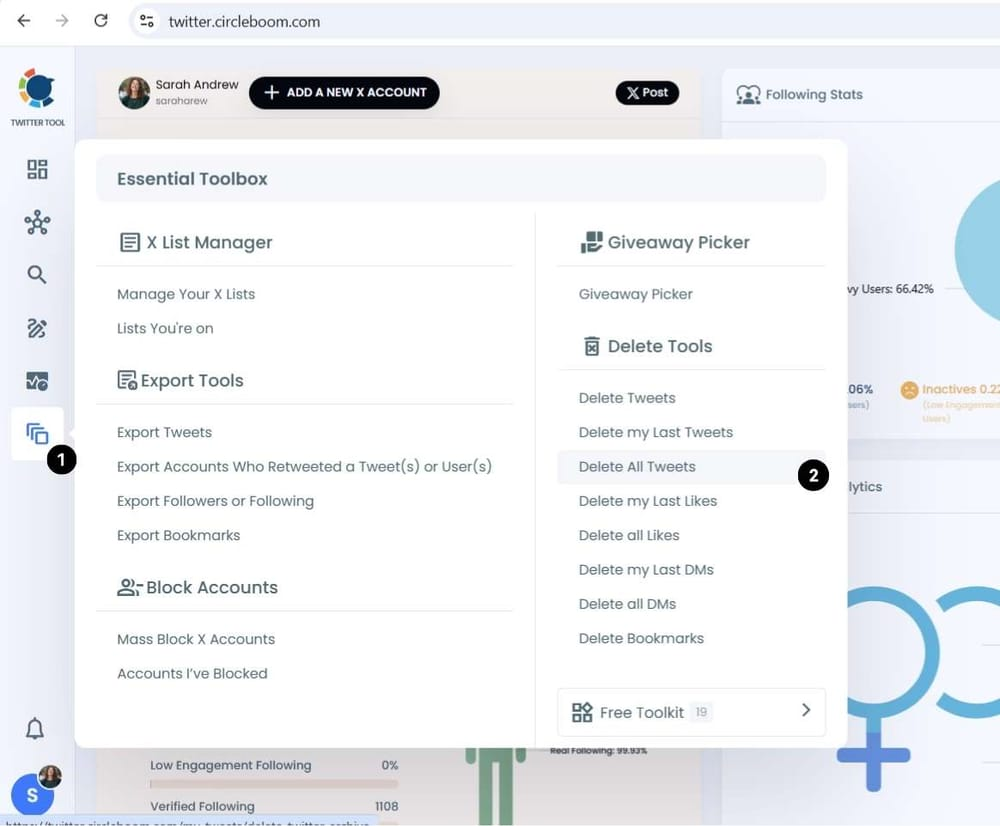
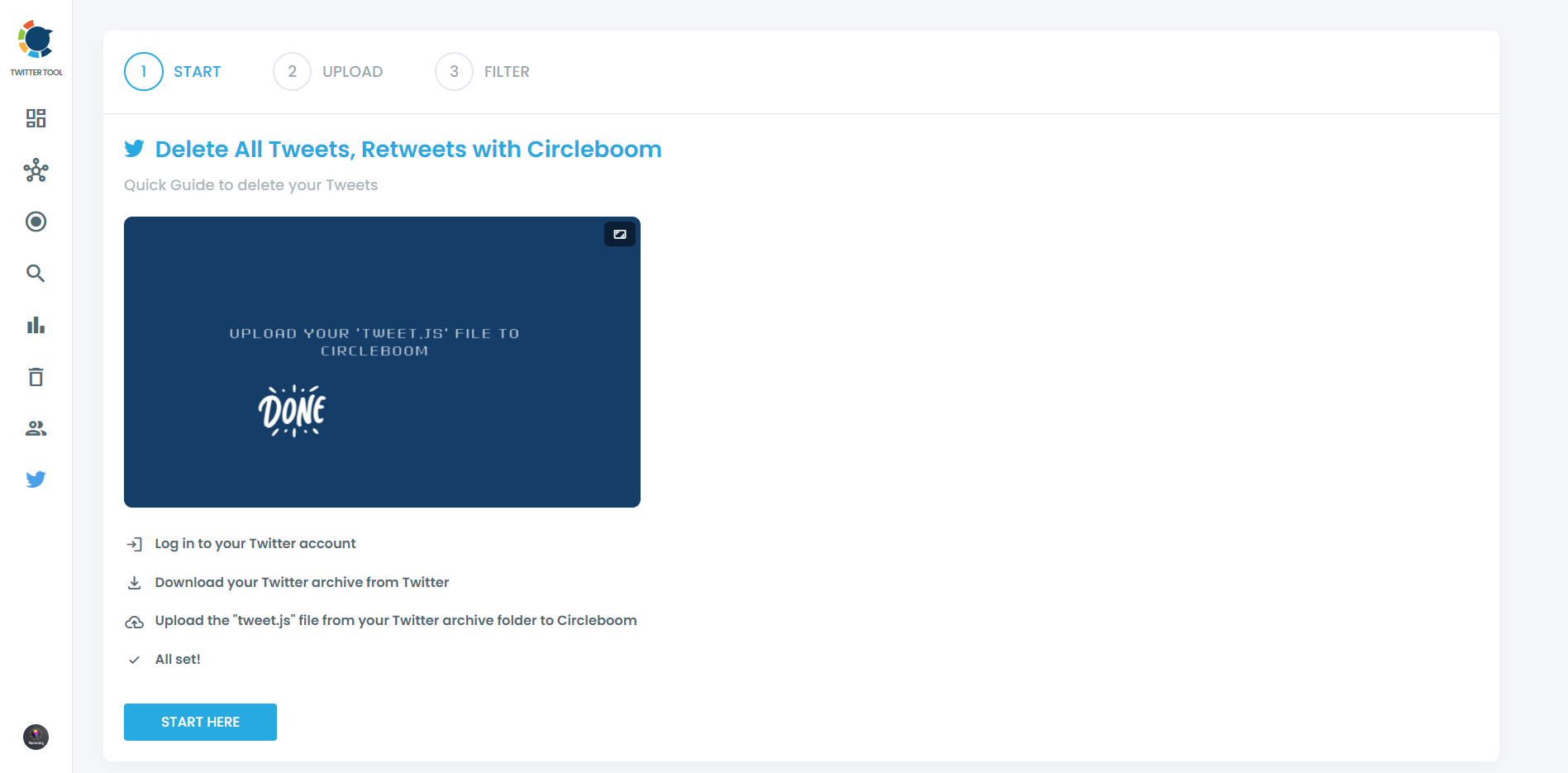
Step #2: Now, you've been taken to a start page where you can upload your Twitter Archive.
If you haven't downloaded your Twitter Archive file yet, you can find out how to download Twitter Archive here.
 Kevin Frank
Upload your Twitter Archive fill, and choose "Approve" to complete the process.
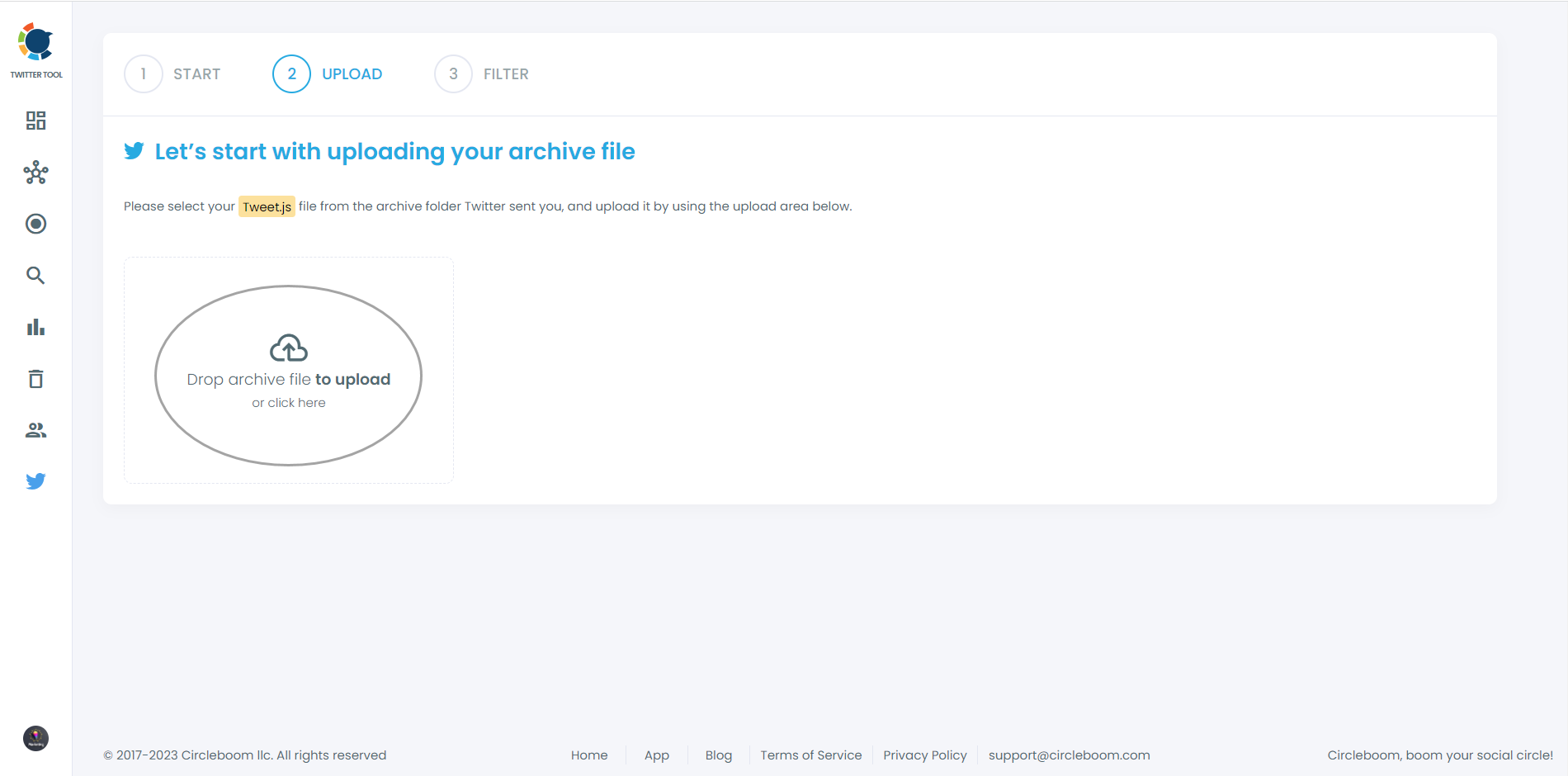
Step #3: Circleboom will have all your tweets.
Now, it is time to filter them by date. For example, you may want to delete all tweets before 2023. Yes, that is possible with Circleboom!
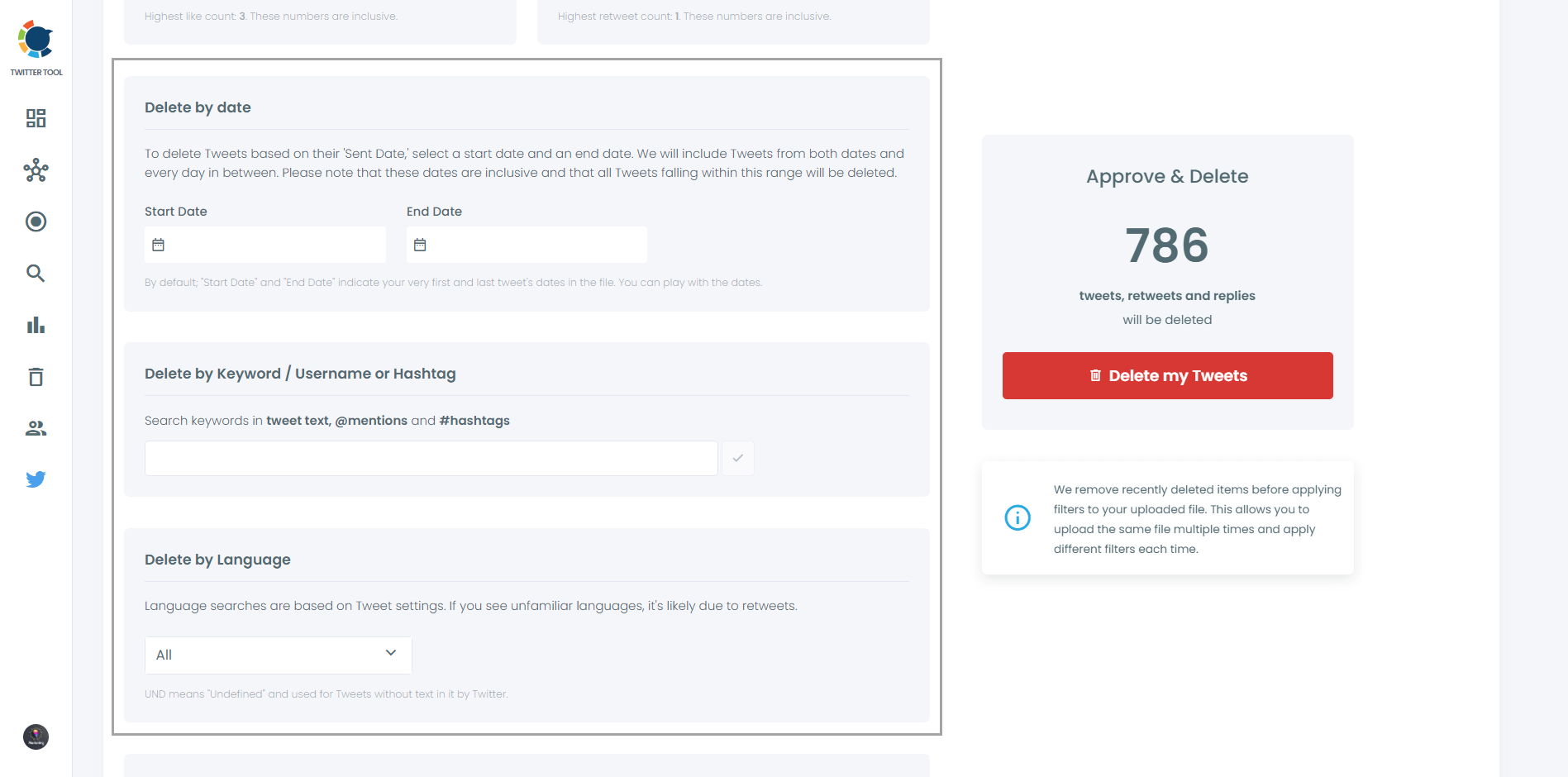
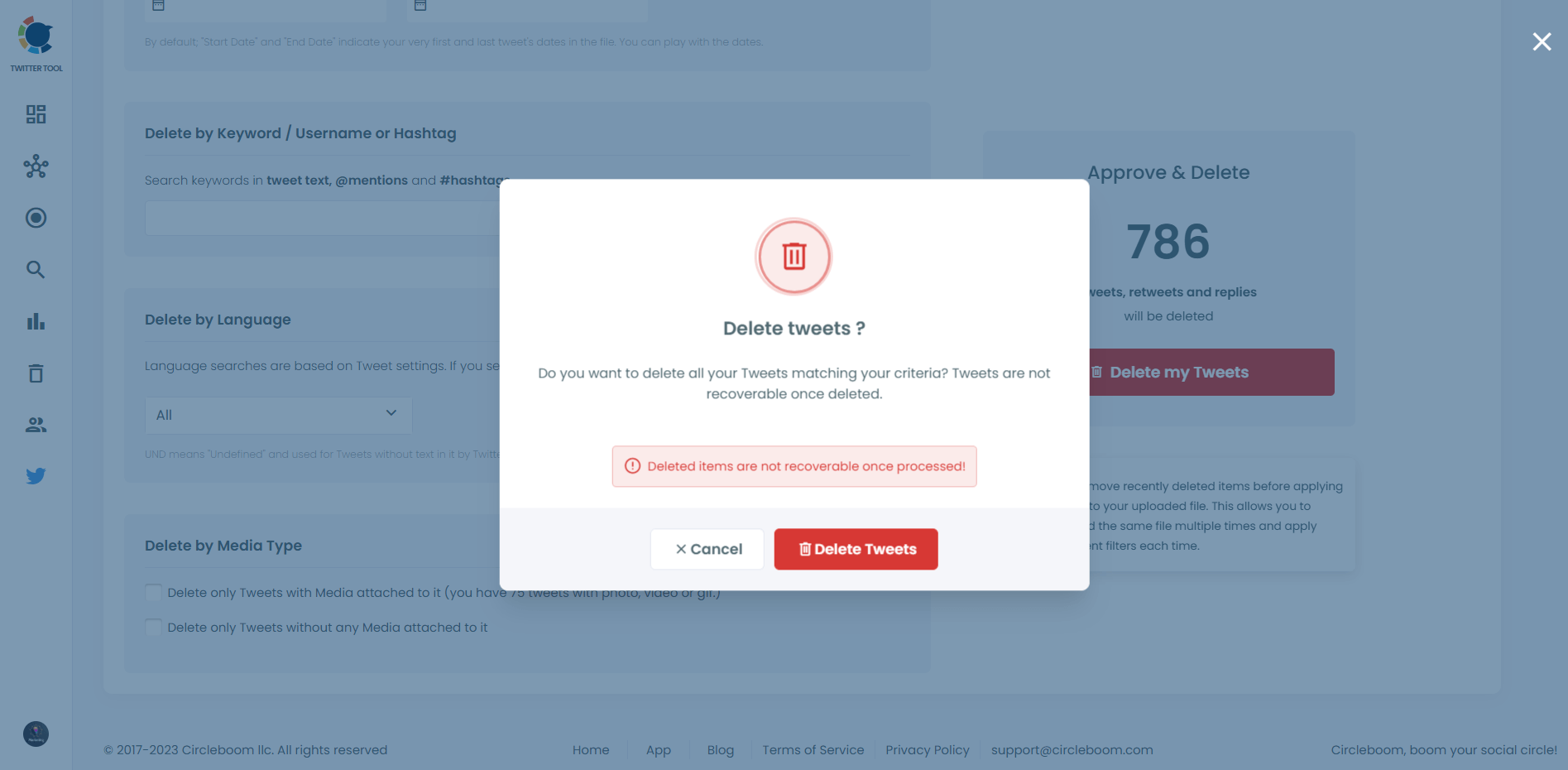
Step #4: After defining the particular period, those tweets will be detected to be deleted by date.
If you are sure to delete these tweets, mass delete them with one click!
Generating Compliance Logs That Auditors Can Actually Use
A deletion without documentation is not a compliance action. For auditors reviewing your social media governance, the deletion record needs to answer specific questions: what was deleted, when was it deleted, who authorized the deletion, and was the deletion consistent with the stated retention policy.
Circleboom generates exportable logs that capture the deletion activity from your Twitter brand account, including the date range of tweets removed, the total count of deleted posts, and the timestamp of the deletion action. These logs can be exported and stored alongside your other compliance documentation.
For regulated industries, this log becomes part of the audit trail that demonstrates adherence to your social media retention policy. For legal review, it establishes that the deletion was systematic and policy-driven rather than selective or responsive to litigation, which is an important distinction in e-discovery contexts.
Date-Based Filtering: How to Target Tweets Older Than 30 Days
The precision of date-based filtering is what makes rolling deletion compliance-grade rather than approximate. Circleboom's Delete All Tweets tool lets you set exact date parameters for deletion, so the 30-day boundary is enforced consistently each time the deletion cycle runs.
This is critical for auditors who need to verify that the retention policy was applied uniformly. A deletion log showing that tweets older than exactly 30 days were removed on the same date each month demonstrates systematic policy enforcement. A log showing irregular deletion batches with unclear date criteria raises more questions than it answers.
The filtering capability in Circleboom also allows you to exclude specific tweet types from deletion if your policy requires it. For example, some organizations may want to retain pinned posts, official statements, or earnings-related communications regardless of age. Circleboom's filtering accommodates these exceptions without disrupting the automated workflow.
What Deletion Records Should Include for Legal and Compliance Review
For a tweet deletion log to be useful to auditors and legal counsel, it needs to contain at minimum:
Date range of deleted content. The oldest and most recent tweet included in the deletion batch.
Volume of deleted posts. Total number of tweets removed in the deletion cycle.
Timestamp of deletion action. The exact date and time when the deletion was executed.
Account identification. Confirmation of which brand account the deletion applies to.
Authorization record. Documentation of who authorized or scheduled the deletion cycle.
Circleboom's deletion logs cover these data points and can be exported in formats that integrate with your existing compliance documentation workflow. According to Statista's research on enterprise social media management, enterprise social media compliance tools are among the fastest-growing categories in the social management software space, driven largely by regulatory pressure on brands in financial services, healthcare, and public companies.
Regulated Industries With Specific Social Media Retention Requirements
Several regulated industries have explicit or implicit social media content governance requirements that a rolling deletion policy addresses.
Financial services. FINRA and SEC rules require broker-dealers and investment advisers to retain business communications, including social media, for defined periods. A documented deletion policy that operates after the required retention window satisfies the record-keeping requirement without creating indefinite exposure.
Healthcare. HIPAA-adjacent considerations apply when healthcare brands discuss patient conditions, treatment options, or health claims on social media. A systematic deletion policy limits the window during which potentially non-compliant content remains publicly accessible.
Publicly traded companies. SEC Regulation FD governs the disclosure of material non-public information. Older tweets containing forward-looking statements, product announcements, or financial guidance can create regulatory complications if they remain accessible after the information environment has changed.
Legal services. Bar association advertising rules vary by jurisdiction, and promotional content that may have been compliant at posting may become problematic as rules change. A rolling deletion policy limits the exposure window.
Setting Up a Repeatable Compliance Workflow for Brand Accounts
The goal is a workflow that runs consistently without requiring manual intervention each month and produces documentation automatically at each cycle.
Using Circleboom, the recommended workflow for a brand account compliance team looks like this:
Monthly or rolling automated deletion cycle: Set the deletion filter to remove tweets older than 30 days and schedule it to run at the same time each month.
Automated log export: After each deletion cycle, export the log and store it in your compliance document management system with a standardized naming convention that includes the account name and deletion date.
Quarterly compliance review: Every three months, review the deletion logs to verify the policy is being applied consistently and to document any authorized exceptions.
Annual policy review: Once per year, review whether the 30-day window remains appropriate for your regulatory context and update the Circleboom schedule accordingly.
This four-step cycle gives compliance teams, legal counsel, and auditors a structured, defensible record of your brand's social media retention practices on X.
How Circleboom Keeps Brand Accounts Safe and Compliant
Any tool that deletes content from a brand's Twitter account must operate within X's API policies. Unauthorized deletion tools, scrapers, or automation methods that violate X's terms can result in account suspension, which is the exact opposite of what a compliance-focused brand needs.
Circleboom is an Official X Enterprise Developer. Every deletion, every log, and every automation action runs through X's official API with full rate-limit compliance. Your brand account is protected from suspension risk while the deletion policy is being enforced.
Keep in mind that the API provides a more accurate real-time data stream than the X interface itself. While the platform UI may experience lag, the API captures and reflects new developments instantaneously.
Circleboom has the official Enterprise API, we don't scrape data from X!
Circleboom is trusted by NBC News, BBC, the American Red Cross, and L'Oréal. Organizations with compliance obligations at that scale choose Circleboom specifically because its API compliance record is verifiable. For a brand account implementing a formal tweet retention policy, that compliance track record is not a minor feature. It is the foundation the entire workflow depends on.
FAQ
Can Circleboom delete tweets from multiple brand Twitter accounts under one compliance workflow? Yes. Circleboom supports multiple connected accounts under a single dashboard, which means a social media governance team can manage and document deletion cycles across several brand accounts from one interface, with separate logs per account.
Does auto deleting tweets affect the brand account's engagement metrics or standing on X? Systematically deleting old tweets does not directly penalize your account. In fact, removing low-engagement historical content can improve your overall engagement rate ratio, which has a positive effect on how X's algorithm distributes your current content.
 Altug Altug
What happens to replies and quote tweets on deleted content? When a tweet is deleted, its direct reply threads become orphaned on X but may remain visible in some contexts. Quote tweets from other accounts are not affected by your deletion. Circleboom's deletion action removes the original tweet from your account only.
Can we exclude specific tweet types from the rolling deletion, such as pinned posts or official statements? Yes. Circleboom's filtering allows you to apply deletion selectively by date, content type, or engagement threshold. You can set the system to preserve specific categories of tweets while deleting the rest within the date range.
How does Circleboom's deletion log prove the policy was applied consistently and not selectively? The deletion log records the exact parameters used for each deletion cycle: date range, total count, and timestamp. Because the filter criteria are the same each cycle, the log pattern itself demonstrates systematic rather than selective application, which is what auditors look for.
Is Circleboom safe to use with verified and high-profile brand Twitter accounts? Yes. Circleboom operates as an Official X Enterprise Developer with full API compliance. Verified brand accounts, including those of major media organizations and global brands, use Circleboom without policy risk. The platform is specifically designed for accounts where compliance and account safety are non-negotiable.
Conclusion
A brand account on X without a tweet retention policy is a compliance liability that grows with every post. A rolling 30-day auto deletion cycle with documented compliance logs turns a reactive problem into a proactive governance standard. Circleboom's Auto Delete tool gives brand accounts the date-based filtering, bulk deletion automation, and exportable compliance logs that auditors and legal teams need to verify the policy is actually being enforced.
Start building your brand account's tweet retention and compliance workflow with Circleboom's Auto Delete tool today.