

Paste a tweet a second time and you put two things at risk: the reach of the copy, which the platform can limit, and the engagement of the original, which the copy now competes with. Skip the repeat entirely and most of your followers never see a post that deserved them. There is a third option, and it takes about as long as pasting.
Can you post the same tweet twice on Twitter?
Not as a pasted copy, but you can show the same tweet again by reposting the original. Circleboom schedules a repost of your own tweet on Twitter, takes the repost down after a set time and repeats the cycle using official X Enterprise APIs.
→ Repeat a post without duplicate tweets
What a pasted repeat costs you on Twitter
A pasted repeat costs you reach on the new post and attention on the old one. Both losses come from the same fact: the platform and your followers now see two posts where there was one.
X has a published rule for this pattern. Its policy on copypasta and duplicate content explains how identical or near-identical posts are treated and which visibility limits can apply.
X does not state how many repeats it takes, so nobody outside the company can give you a safe count for duplicate tweets.
The second cost of duplicate tweets is easier to see. The copy starts with no likes and no replies, while the original keeps the conversation. A follower who meets the copy sees a quiet post.
There is also the blunt version of the problem, where the second post never goes out. If X rejected your identical tweet, the Circleboom blog covers that symptom under why you can't post on Twitter and how to fix it.
I have watched people respond to all of this by tacking an emoji or a hashtag onto the copy. That edit changes the string, not the situation. The post is still a near-identical repeat.
The cleaner move is to stop creating a second post at all, which rules out duplicate tweets before any policy comes into it. There is a way to give a tweet a second showing with no duplicate, and the rest of this guide covers it.
The safe way to repeat a post on X is a repost of the original
A repost puts your existing tweet back in front of followers without creating a new one. The tweet keeps its replies, its likes and its place on your profile.
Circleboom's Auto Retweet schedules that repost for your tweets on X. It is part of the X Post Planner, and it handles three jobs for you: the repost, the removal of the repost, and the repetition of both.
Compared with pasting, the difference is structural. A pasted tweet is new content that matches old content. A repost is old content shown again through the platform's own repost action.
You repeat the showing. You never repeat the post.
That is why this route keeps you away from duplicate tweets by design. There is no second text for a duplicate content rule to compare.
Why the access behind the repost matters
Circleboom is one of the companies on X's official Enterprise developers list. For you, that means a scheduled repost goes through sanctioned access, so your account is not handed to a tool that imitates a browser session.
Automation still has rules. X's automation rules cover what automated actions may do, including a ban on duplicative or substantially similar automated posts.
A scheduled repost of your own tweet is a different action from an automated duplicate post. It is not a free pass, though. Circleboom's documentation warns that excessive automated reposting of the same tweet may be flagged as spam-like behavior.
The penalty people fear most is reduced visibility across the account. That subject has its own article on the Twitter ghost ban and how to avoid it.
So the method is safe when two conditions hold. The tweet must deserve the repeat, and the repeats must be spaced. The next two sections take those in turn.
The same setup in motion: smart scheduling, bulk scheduling and Auto Retweet configured for tweets that publish on their own.
When you are ready to set one up, this is the page to open: a repost cycle that replaces duplicate tweets.
Is the tweet still worth repeating? A pre-flight check for X
A tweet is worth repeating only if it is as true and as useful at repost time as it was when you wrote it. Run this check before you configure anything, because the tool will not run it for you.
Confirm each of these on the tweet:
- Dates. Any event the tweet mentions is still ahead, not behind.
- Offers. Any discount, opening or availability it promises is still valid.
- Claims. Every fact and figure in it is still correct.
- Links. Every linked destination still loads and still matches the text.
- Wording. Nothing in it says "live now," "today" or similar once that stops being true.
Circleboom's documentation is direct on this point: the feature does not check whether an announcement remains valid. A repost cycle will bring back an expired offer as faithfully as a current one.
Past performance is the other half of the check. Strong engagement the first time is a selection clue, not a guarantee of a second strong result.
A tweet that the audience ignored is a poor candidate. Cycles spent on it are cycles taken from a stronger post.
Time-sensitive posts are not excluded. A launch or an event reminder can be repeated while its information holds, with every planned repost kept inside that period.
If the tweet fails the check, do not repeat it. Write a fresh post, or rewrite the old one so the dated part is gone.
How far apart should repeats of a tweet be on Twitter?
Far enough apart that each repeat meets a different part of your audience. Circleboom's documented best practice puts it as a comparison: 3 cycles spread across a day work better than 6 reposts within 3 hours to the same followers.
What six reposts in three hours do to the same followers
The numbers below are an illustration built from that documented comparison, not measured results.
Six reposts inside three hours means a repost about every 30 minutes. The people online during those three hours are largely the same people throughout.
Suppose, as the product documentation does in one of its examples, that roughly a third of your followers are online at a given time. The tight pattern shows that third the tweet up to seven times, counting the original. The other two thirds may not see it at all.
Now take the spaced pattern. With RePost after 4 hours, Un-RePost after 2 hours and Repeat this cycle set to 3, the documentation counts four visibility windows: the original plus three reposts.
Spread over a day, those four windows can each open on a different group. Fewer showings, more people reached, and nobody shown the same tweet seven times in an afternoon.
A spacing rule of thumb
From that comparison, a working rule follows:
- Keep one tweet to about three repost cycles in a day.
- Stretch the gap until each repost lands in a different activity window.
- Give evergreen tweets longer gaps, up to weeks.
- End the cycles for a timely tweet when its event ends.
Spacing is also what separates a planned repost from the pattern of duplicate tweets, which is the same content sent close together to the same people.
Tight cycles have a cost beyond annoyance. Showing the same tweet to the same followers again lowers engagement per impression, which is the number that tells you whether a post still earns its place.
How to repeat a tweet on Twitter without posting a duplicate
The flow has three phases: reach the tweet, set the cycle, then schedule it.
Reach the tweet instead of retyping it
- Open Circleboom Twitter and connect the X account that owns the tweet.
- Go to the X Post Planner menu. Auto Retweet is configured from here, and so is Post Analytics.

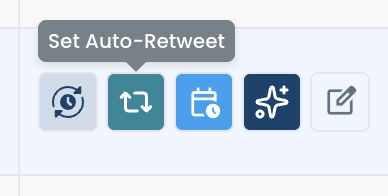
- Find the tweet in Post Analytics and click Set Auto-Retweet in its row of action buttons. For a tweet you have not published yet, write it in the post editor and click the repost icon with cycle arrows in the toolbar.
Set a spaced repost and its removal
- Tick RePost after and set the delay with the hours and minutes steppers. Use the gap you chose in the spacing section.
- Tick Un-RePost after and set how long the repost should stay up. Leave this box unchecked only if you want the repost to remain.
- Set Repeat this cycle to the number of rounds. Three is the count the documented comparison supports for a single day.
Schedule the cycle and leave the original alone
- Apply the settings, then publish or schedule the tweet if it is not live yet. The cycle is saved alongside the post and runs without further action from you.
The sequence holds up for one reason: the text is never typed twice, so duplicate tweets cannot happen. You start from the published tweet, fix the spacing before anything goes out, and decide the removal in the same panel as the repost.
One condition matters most once the cycle is running. The original tweet has to exist at each repost time, because a cycle fails for any interval where the tweet is gone.
A repost cycle is one piece of planning posts ahead of time. If you want the wider setup, Circleboom has an article on how to automate Twitter posts.
How to check your X account after the repeat
Check the account with a visibility test if reach drops across several posts after you repeat one. A dip on a single post is normal and proves nothing.
This step matters most for anyone who already has duplicate tweets on their profile from before reading this. You cannot undo the paste by worrying, but you can find out whether anything is restricted.
Circleboom's Twitter Shadowban Test takes a username and a click on Search. It returns a summary verdict and a separate result for each of five checks.
What the five checks tell you
The five checks are named:
- Search Suggestion Shadow
- Total Search Blackout
- Reply Lock
- Reply Visibility Filter
- Early Engagement Seed
The value is in the separation. A search restriction and a reply restriction call for different responses, and a single yes or no would hide which one you have.
One check deserves a note for this topic. The tool's documentation says Reply Lock is often triggered by sudden spikes in activity or automated-looking behavior, which is the pattern a burst of repeats can resemble.
If a check does report an issue, the documented recovery steps include deleting spammy or repetitive tweets. For someone with duplicate tweets on their profile, that means removing the copies and keeping the original.
The Circleboom blog also has an article on the Twitter shadowban test for anyone who wants more before running it.
Whatever the result says, the habit is worth changing. Duplicate tweets cost you engagement even when no restriction shows up.
Your checklist for repeating a tweet on X
The safe repeat is a repost of the original, chosen with care and spaced across the day. I keep the whole method to five actions:
- Pick a tweet that earned strong engagement and still passes the pre-flight check.
- Start from the published tweet, never from copied text.
- Set RePost after so the repost lands in a different activity window.
- Turn on Un-RePost so the profile shows the tweet once.
- Hold one tweet to about three cycles a day, then let it rest.
Follow those and the question of whether a repeat is "allowed" mostly answers itself, because nothing you send is a copy.
→ Set up a spaced repost and leave duplicate tweets behind
What to know before you repeat a tweet
Should I delete the first tweet and post it again instead?
No, not for reach. Deleting removes the tweet with its likes and replies, and a repost cycle cannot run on a tweet that no longer exists. Delete only when the tweet is wrong or out of date.
Should I rewrite the tweet with AI instead of repeating it word for word?
Rewrite it once it has already been through its repost cycles. Circleboom's guidance is to follow a tweet that has finished its cycles with a rewritten version that has a new hook. You can rewrite your old tweets with AI in Circleboom for your X account.
Can a repost stay on my profile permanently?
Yes. Leave the Un-RePost after checkbox unchecked in Circleboom and the repost of your X post stays until you remove it yourself.
What can stop a scheduled repost cycle from running?
A deleted original, a suspended account, a changed password or revoked app permissions will each interrupt it. The connected X account must stay authenticated and active for Circleboom to place each repost.
Can I run repost cycles on many tweets at the same time?
Yes, within limits. X's API rate limits apply to automated actions, so high-frequency cycles on several posts at once may hit a ceiling that depends on the connected account's access tier.

