

No, tweeting a lot does not hurt engagement on its own. What hurts is posting weak, repetitive, or badly timed tweets, and that can happen at any volume. Accounts that post consistently stay in their followers' timelines more often, so the safer move is usually to tweet more, not less, while keeping quality up. Circleboom's Post Engagement Analytics shows how your own engagement rate behaves when you post more, and its AI Writer, Inspiration, and Best Time to Post tools make it easier to keep that volume up.
The worry usually starts with a single bad week. You post more than usual, a few tweets get almost nothing, and the conclusion writes itself: you are annoying people, the algorithm is punishing you, it is time to slow down.
So you post less. Two tweets a week instead of two a day. Engagement per tweet might tick up a little, because only the best ideas make it out. But total impressions drop, new followers stop arriving, and the account slowly fades from timelines it used to appear in.
That trade is rarely worth it. On X, every tweet is another chance to be seen, and the timeline moves fast enough that most followers never see most of what you post. The tweets that flopped in that bad week were probably not hurt by the ones around them. They were just weaker, or went out when nobody was online.
The real question is not "am I tweeting too much?" but "are the extra tweets good enough and well timed?" With Circleboom Twitter, you can answer that from your own data: sort every recent tweet by engagement rate, compare busy weeks with quiet ones, and then use AI drafting, trending inspiration, and audience based scheduling to post more of what works.
The weekly loop Circleboom is built around
Posting more without burning out comes down to a simple cycle. Circleboom, an Official X Enterprise Developer working with data from X's official API, has a tool for each step:
- Measure. Post Engagement Analytics lists your recent tweets with impressions, engagements, engagement rate, likes, reposts, replies, and clicks, and lets you sort by any of them. That is where you see whether busier periods actually dragged your numbers down.
- Find ideas. Inspiration shows trending, high performing tweets in your topics, so you always have something to react to, rewrite in your own words, or quote.
- Write faster. AI Writer, inside X Post Planner, turns a few words into a full post. With My Style, it learns from your past tweets so drafts sound like you.
- Post when people are online. The planner's "Find your best posting time" button suggests time slots based on when your followers are active, so extra tweets land in front of an audience instead of an empty timeline.
- Recycle winners. Rewrite with AI, Reschedule, and Auto Retweet give proven tweets a second round for followers who missed them the first time.
Run that loop once a week and the question of volume mostly answers itself. You post more, but most of what you post is either new and well timed or already proven.
How to check if tweeting too much hurts your engagement with Circleboom
Step 1: Open Post Engagement Analytics. Log in to Circleboom Twitter, connect your X account, and open Post Engagement Analytics. Your recent tweets load in a table with impressions, engagements, engagement rate, likes, reposts, quotes, and URL clicks.
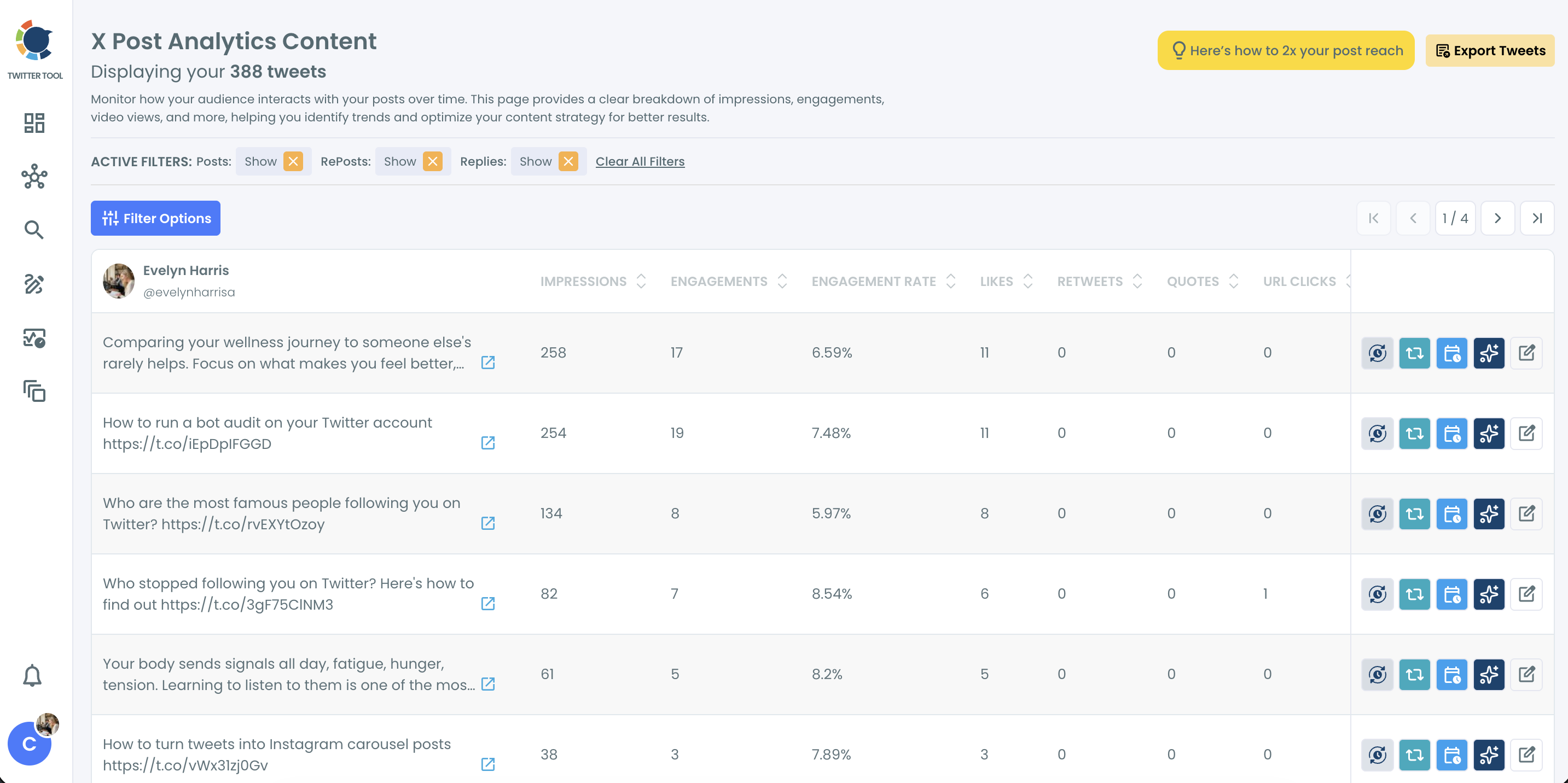
Step 2: Compare a busy period with a quiet one. Open Filter Options and set a date range for a week when you posted a lot. Note the average engagement rate of those tweets. Then switch the range to a week when you posted less and compare. If the busy week holds up, volume is not your problem.
📌 Look at total engagements as well as the rate. A week with twice as many tweets and a slightly lower rate can still bring far more likes, replies, and new followers overall.
Step 3: Sort to see what actually underperformed. Sort by engagement rate from low to high. The weakest tweets usually share something: a vague topic, no hook, a link with no context, or a posting time when your audience was asleep. That pattern is what to fix, not the number of tweets.
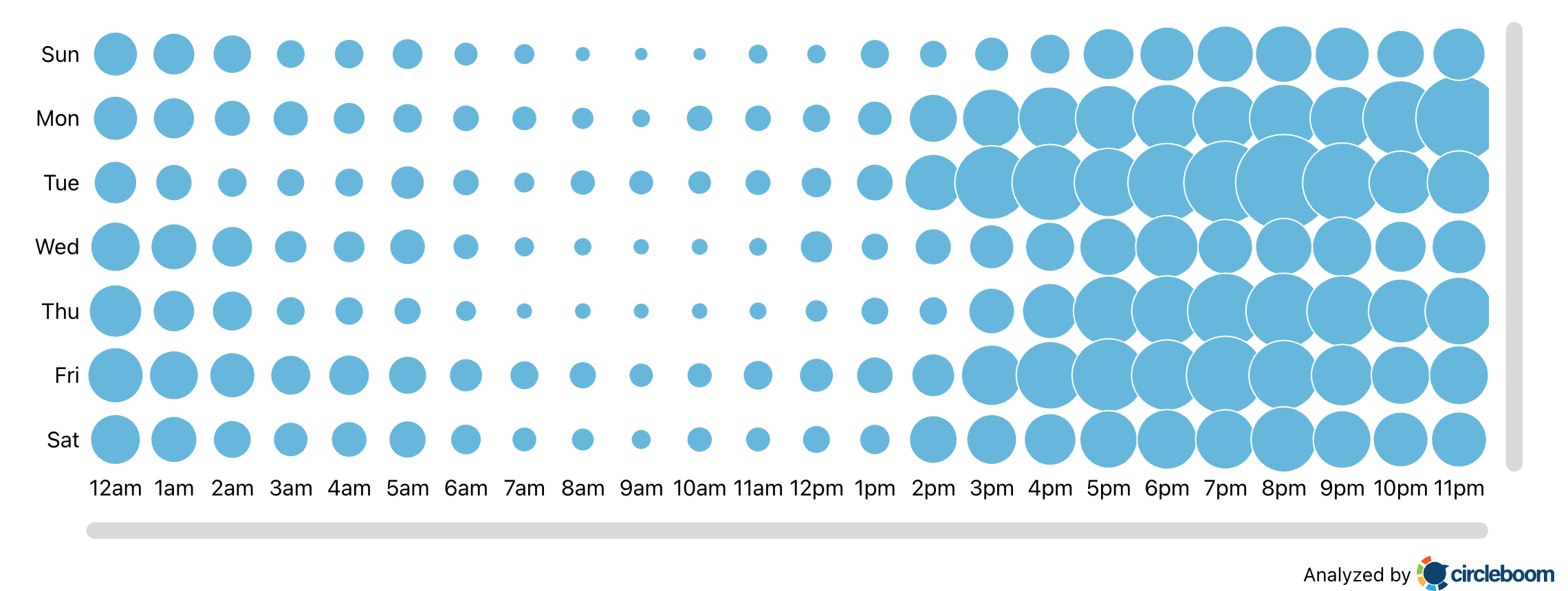
Step 4: Find your best posting times. Check When Followers Are Online to see which days and hours your followers are active. When you schedule in X Post Planner, the "Find your best posting time" button suggests slots based on that activity.
Step 5: Fill the calendar with AI Writer and Inspiration. Open AI Writer, type a few words about what you want to say, and refine the draft in the chat until it sounds right. Turn on My Style to match your voice. When you have no idea where to start, browse Inspiration for trending posts in your topics and rewrite one in your own words.
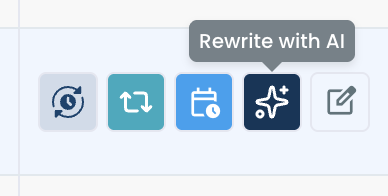
Step 6: Give your best tweets a second round. Back in Post Engagement Analytics, sort by engagement rate from high to low. Use Rewrite with AI to refresh an older winner with a new hook, Reschedule to send it out again at a peak time, or set Auto Retweet so it resurfaces for followers who missed it.
Why tweeting too much is rarely the real problem
X's timeline is crowded and fast. A tweet has a short window to collect early likes and replies before it slides down the feed, and most followers are not online for most of the day. Posting less does not make each tweet more visible. It just means fewer chances to catch people when they are scrolling.
Engagement rate also tends to mislead people here. It is engagements divided by impressions, so it measures how well a tweet converted the views it got, not how much the account grew. An account posting once a week can have a high rate and almost no reach. Our post on what a good engagement rate on Twitter is covers the commonly cited benchmarks.
What does hurt is the kind of posting that comes with forced volume: the same text copied again and again, filler tweets with no point, or a dozen posts dumped at 3 a.m. Those habits drag engagement down, but they are about quality and timing, not frequency.
📌 Reposting the exact same wording repeatedly is the one pattern worth avoiding. Rewrite with AI keeps a proven idea and changes the words, so a winner can come back without looking like a copy. Our guide on how often to post duplicate content goes deeper.
Consistency matters more than restraint. An account that shows up every day trains its followers to expect it. An account that disappears for a week to "protect engagement" is easy to forget. Tweet Stats shows your posting volume over time, which makes gaps easy to spot.
What happens when you post more, the right way
You get more chances to be seen. Every well timed tweet is another shot at reaching followers who missed the last one, and at landing in the For You feed of people who do not follow you yet.
You learn faster. Ten tweets a week give you ten data points about what your audience likes. Two give you two. More posts make the patterns in Post Engagement Analytics clearer, and your next tweets get better because of it.
Your best ideas travel further. A tweet that worked once usually works again for a different slice of your audience. Recycling winners with Auto Retweet and rewrites turns one good idea into several rounds of reach. See how to see your most liked tweets for more on finding them.
You stop running out of things to say. The main reason people post less is not strategy, it is fatigue. Inspiration and AI Writer remove most of the blank page problem, which is what makes a higher posting rate sustainable. Pair that with bulk scheduling and a week of posts can be ready in one sitting.
Your audience gets cleaner signals. Followers who see you regularly are more likely to reply, repost, and stick around. Followers who barely see you are more likely to drift away. Check how to improve your Twitter engagement rates for more tactics.
FAQ
Does tweeting too much hurt engagement?
Not by itself. Engagement drops when tweets are low quality, repetitive, or posted when followers are offline. Consistent, well timed posting usually brings more total engagement, not less.
How many times a day should I tweet?
There is no universal number. Start with a pace you can keep with quality, then check Post Engagement Analytics after a few weeks. If engagement holds up as you add tweets, keep going.
Why did my engagement drop when I posted more?
Usually because the extra tweets were weaker or went out at the wrong time. Sort your tweets by engagement rate in Post Engagement Analytics and look at what the lowest performers have in common.
Is it bad to post the same tweet more than once?
Posting the exact same text over and over is worth avoiding. Use Rewrite with AI to refresh a winning tweet with a new hook, or Auto Retweet to resurface the original for followers who missed it.
How can I post more without running out of ideas?
Use Inspiration to see trending posts in your topics and rewrite them in your own words, and AI Writer to turn short notes into full posts. With My Style, the drafts match the way you already write.
What is the best time to tweet?
It depends on when your followers are online. When Followers Are Online shows your audience's activity by day and hour, and the "Find your best posting time" button in X Post Planner suggests slots directly while you schedule.
Does posting more help me get new followers?
More posts mean more chances to appear in timelines and in the For You feed of people who do not follow you yet. As long as the tweets are worth reading, a higher posting rate tends to help growth.
Final thoughts
Cutting back feels like the cautious choice when a few tweets flop, but it usually trades a small dip in engagement rate for a big drop in reach. Tweeting too much is rarely the real problem. Tweeting without ideas, without timing, and without knowing what works is. Circleboom gives you the data to see what your audience responds to and the tools to post more of it, at the moments people are actually scrolling.
Check how your tweets really perform with Circleboom's Post Engagement Analytics:
https://circleboom.com/twitter-management-tool/twitter-post-analytics/engagement-analytics

