
Yes. Circleboom Publish schedules one Bluesky post to all three of a news site's accounts in a single send, each at a time that suits that account's readers.
Three things a local newsroom gets from one Bluesky composer.
• One composer that sends a story to the news, sports and culture accounts together.
• A saved group per desk, plus one group for breaking news on every account.
• An RSS rule that posts new articles to Bluesky without anyone copying links.
Circleboom Publish schedules Bluesky posts across any number of Bluesky accounts from one composer. Write once, pick all three desks and schedule Bluesky posts for multiple accounts from one calendar.
Why a news site's three Bluesky accounts drift out of sync
A local news site on Bluesky usually runs more than one account: a main news account, a sports account and a culture or events account. Each desk publishes on its own rhythm, and the big stories belong on all three.
Without a shared tool, every cross-desk story means logging in to each account and posting it again. A council vote that matters to news readers and to the culture crowd gets posted twice, minutes apart, by two different people, or once and forgotten on the second account.
The arithmetic is plain. Three accounts posting four stories a day is twelve posts a day, or about 360 a month. When each one needs its own login and paste, the smaller desks are the first to go quiet.
The newsroom's real need is to schedule Bluesky posts for multiple accounts from one place. When you can schedule Bluesky posts for multiple accounts in one action, a story shared by all three desks becomes one send instead of three.
Readers who are new to the question of whether Bluesky scheduling is possible at all will find the background in can you schedule posts on Bluesky.
How Circleboom Publish schedules Bluesky posts for several accounts
Circleboom Publish gives Bluesky the same composer as X, with one important difference: on Bluesky, any number of accounts can be selected for the same post. X allows one X account per post in that composer, as a safeguard against its spam detection, while Bluesky has no such restriction.
For a newsroom, that difference is the whole workflow. One composer can schedule posts on every Bluesky account at once, and the Schedule modal handles the date and time for all of them.
The company behind the tool matters when a newsroom hands over its accounts. Circleboom is an official X Enterprise API partner, so accounts connect through approved platform access rather than scraping workarounds.
Share Groups mirror the newsroom's Bluesky desks
A Share Group is a saved bundle of accounts, created under Settings, then Manage Share Groups, and picked in the composer under Select by Share Group. A media company is the classic case: a group per desk for news, sports and culture, and one group with every account for breaking news.
That setup means the sports editor clicks one group and reaches only the sports account, while the breaking-news group reaches all three.
Nothing lands on the wrong desk by accident.
The full multi-account setup is described on the page to manage multiple Bluesky accounts.
Each Bluesky account gets its own best time
Best Time to Post is computed per account, from that account's own followers, and separately from any X account, which matters when you schedule Bluesky posts for multiple accounts with different readers. The sports account's readers and the culture account's readers keep different hours, so their suggested slots differ.
For readers comparing schedules across networks, the analysis in best time to post on Bluesky explains why one generic chart rarely fits a specific audience.
How to schedule Bluesky posts for multiple accounts
To schedule Bluesky posts for multiple accounts, connect each account to Circleboom Publish once, save each desk as a Share Group, then open the Bluesky composer, select a group and schedule the post. The schedule applies to every selected account in the same send.
Set up the newsroom's Bluesky accounts and desks
- Open Circleboom Publish and go to Settings in the gear-icon menu.
- Connect each Bluesky account under Manage Social Accounts with CONNECT NEW ACCOUNT: news, sports and culture.
- Create Share Groups under Manage Share Groups: one per desk and one named "All accounts" for breaking news.
Schedule each story to the right desks
- Open the Bluesky Specific composer from the dashboard card or the sidebar's Create New Post menu.
- Select by Share Group, then write the post under 300 characters and attach up to 4 images of 2 MB or less.
- Click Schedule, pick the date and a time from "Pick your best post time," or type one in Set Time, and confirm.
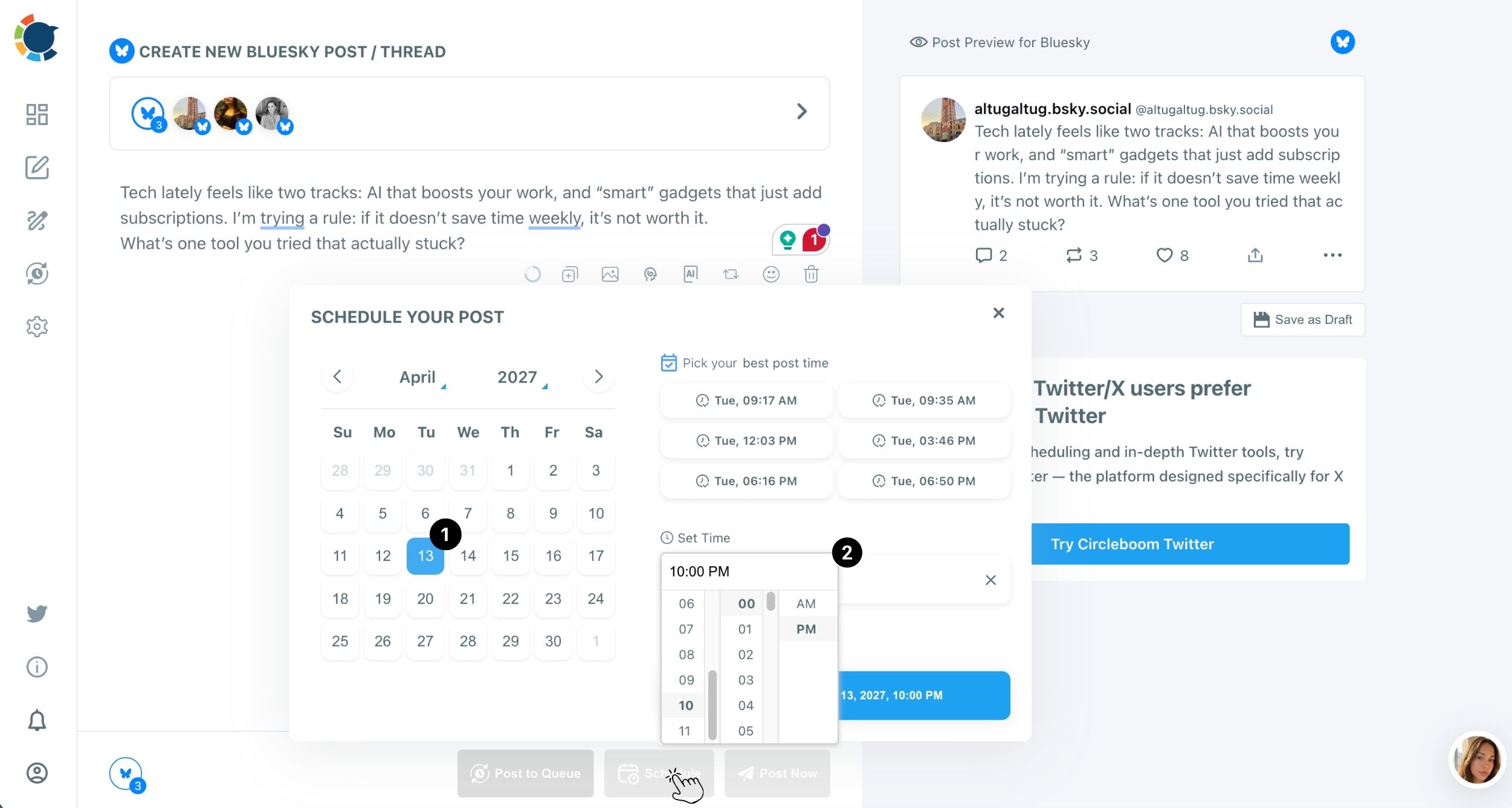
Picking the desk group first means the draft is checked against Bluesky's 300-character and 2 MB limits once for every account that will carry the story, and the Schedule step then times a single send for all of them.
Once confirmed, the post sits in the Outbox, where it stays editable until it publishes.
Should breaking news and planned stories go out on Bluesky the same way?
No. A newsroom posts three kinds of stories, and each fits a different button in the Bluesky composer:
| Story type | Button | Accounts |
|---|---|---|
| Breaking news | Post Now | "All accounts" group |
| Planned feature | Schedule at best time | The desks it belongs to |
| Evergreen guide | Post to Queue | Each desk's own slots |
Post Now publishes immediately to every selected account. Schedule fixes a date and time. Post to Queue drops the post into the next open slot of each selected account's recurring Queue, set in Time and Queue Settings, and Add Best Times to Post fills those slots with each account's suggested times.
Evergreen stories earn a second step. Auto Repost, set in the composer before the post is sent, resurfaces it on a timer with three settings: RePost after, Un-RePost after and Repeat this cycle. A "where to vote" explainer reposted every few hours reaches readers who check Bluesky at lunch and in the evening.
The Bluesky auto poster page covers the Queue side of that automation.
Breaking news goes out now, planned stories go out on time, and evergreen stories keep coming back.
How does a newsroom batch a week of Bluesky posts for all three accounts?
In one sitting. Prepare the posts one after another in the Bluesky composer, give each its own date and time in the Schedule modal, and review the spread in the Outbox. Batching is the easiest way to schedule Bluesky posts for multiple accounts without daily logins.
The practical rhythm for a local outlet:
- Monday: schedule the week's planned features, each to the desks it belongs to.
- Daily: add breaking news with Post Now and let RSS cover new articles.
- Friday: check next week in Calendar View for empty days or a cluster on one account.
Calendar View can be filtered by Platform, Social Account and Share Group, which makes a thin week on the culture account easy to spot.
Stories that are written but not cleared for publication, such as an embargoed report, belong in Save as Draft, which keeps the text, media and selected accounts until an editor schedules them.
A week planned on Monday leaves one Friday review in place of twelve posts typed by hand each day.
Can an RSS feed post new articles to the Bluesky accounts automatically?
Yes. Circleboom's RSS Feed connects a site's feed to Bluesky so every new article posts on its own, with no one copying links. For a news site that publishes all day, this is the baseline that keeps every account active between hand-written posts.
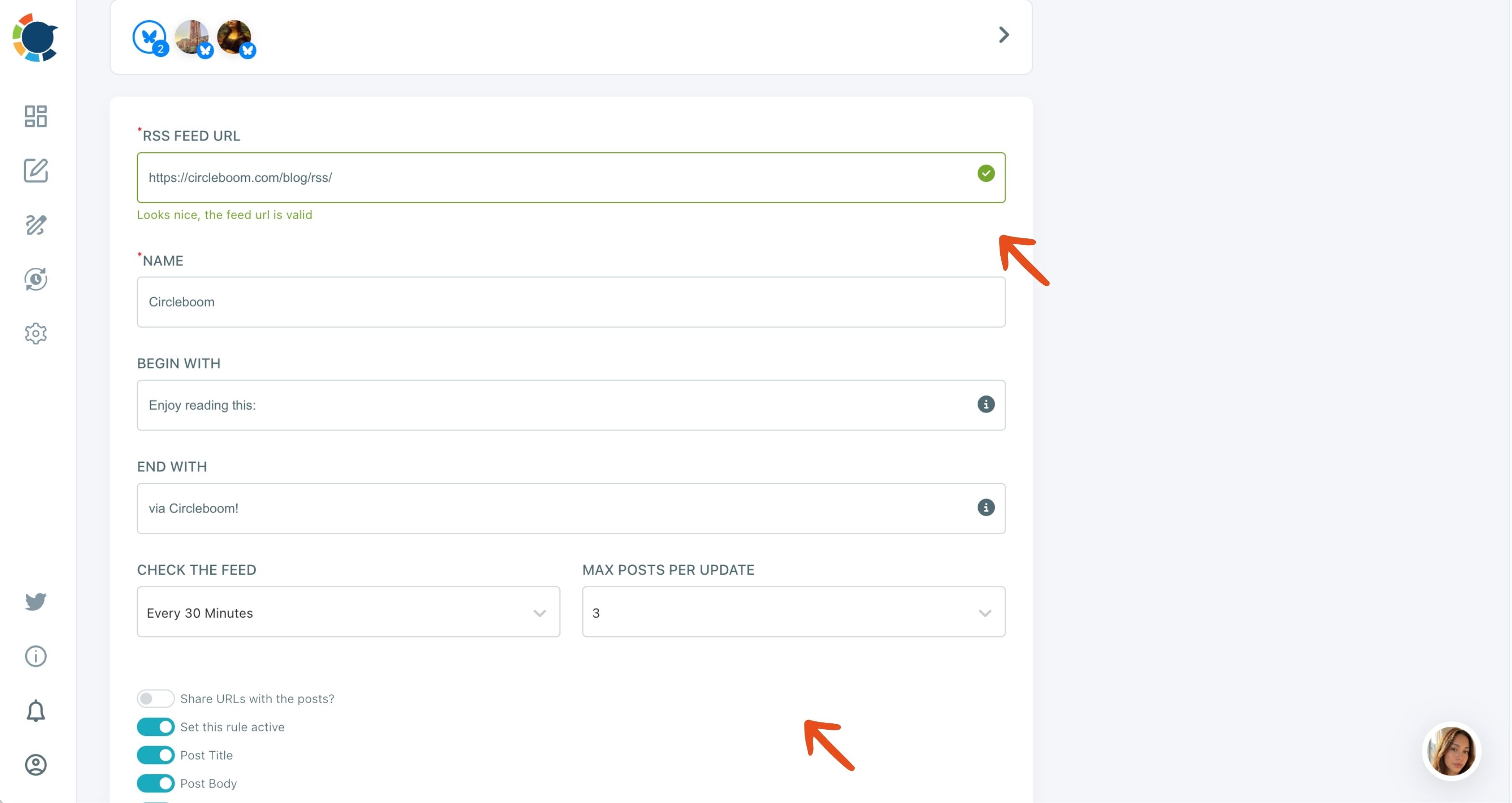
The setup starts from Connect RSS Feeds on the dashboard or "Connect a new RSS feed" in the sidebar. You choose the Bluesky destination in the Account field, name the feed, and set the rule:
- Check the Feed sets how often Circleboom looks for new items.
- Max Posts per Update stops a busy day from flooding the timeline.
- Begin with / End with adds a short prefix or suffix to every post.
- Share URLs and Post Title give each post a headline and a clickable link.
A news site can point each desk's section feed at the matching Bluesky account: the sports section feed to the sports account, the culture feed to the culture account. The RSS feed to social media page lists every supported destination.
The step-by-step guide to set up an RSS feed on Bluesky walks through each field.
Two rules keep RSS posts clean. RSS-sourced posts still carry Bluesky's 300-character limit, so keep Begin with / End with text short. Auto Repost does not apply to RSS-published posts, since it is switched on in the composer before a post is sent.
A 1:35 walkthrough of connecting an RSS feed to a Bluesky account in Circleboom, from adding the account to activating the rule.
Which Bluesky limits does a newsroom hit first?
The image limit. Bluesky allows up to 4 images per post at 2 MB each, the tightest image limit among the platforms Circleboom Publish supports, and newsroom photos straight from a camera or phone are often 3 to 8 MB.
Circleboom's Bluesky limits in full:
- Text: 300 characters per post.
- Images: up to 4, 2 MB each.
- Video: up to 10 minutes and 300 MB.
- Alt text: not available for Bluesky.
When a story needs more than 300 characters, split it into a thread with "Add another post" rather than cutting the facts. The guide on how to post a thread on Bluesky shows how a thread reads to followers.
A thread with Auto Repost resurfaces its first post only.
Because alt text is not available, put the key detail of a photo, such as the location or the name of the event, in the post text itself.
How do hashtags help local stories reach readers on Bluesky?
On Bluesky, hashtags work as topic feeds, so a few relevant tags help a post reach people following that topic, not only the account's own followers. For a local outlet, a city or neighborhood tag is often the one that matters.
Bluesky also lets users choose the feeds they read. Its own announcement of custom feeds describes an open marketplace where people pick the feeds they want. That is why a local story tagged well can travel beyond the account's followers.
The Hashtag Generator sits in the Bluesky composer's toolbar and adds chosen tags in one click. The background on tagging is in how hashtags work on Bluesky.
Keep it to a few tags per post; a stack of them reads as spam.
Who on the newsroom team can schedule to which Bluesky account?
Each person can be limited to their own desk. A Share Group only groups accounts for faster selection; access itself comes from team management, where each person gets a role over a scoped set of accounts.
A sports reporter added as a User sees only the sports account, and their posts wait for an Admin's approval before going live. The editor keeps every account in view in one Outbox and can filter it by Share Group to review one desk's calendar.
That review step matters in news, where a wrong post on the wrong account is a correction. The case for structured roles is set out in social media management for collaborative teams.
Identical text has its own cost. Readers who follow two desks see the same post twice, and repeated wording across accounts tends to hurt reach. Send shared breaking news as one post; for routine stories, let the AI writer give each desk its own wording.
What a three-account Bluesky newsroom schedule looks like
To schedule Bluesky posts for multiple accounts, a local news site sends one story to its news, sports and culture accounts in a single send. Each desk keeps its own Share Group, and RSS posts new articles between hand-written posts. Each account still gets its own best times and its own Queue, so readers see stories when they are online.
→ Schedule your newsroom's Bluesky posts for all three accounts
Newsroom questions about scheduling posts on several Bluesky accounts
Can I edit a scheduled Bluesky post if the story changes?
Yes. When you schedule Bluesky posts for multiple accounts, each one sits in the Outbox, where it can be edited or deleted before it publishes, from List View or Calendar View.
Can I clear a whole month of scheduled posts at once?
Yes. List View has a "Delete All Posts for [Month]" action, but it is irreversible, so use it only when a whole month's plan has to be rebuilt.
Can we track clicks from scheduled Bluesky posts?
Yes. Tag the article link with Circleboom's UTM Link Builder before scheduling, so the clicks each Bluesky account sends show up in Google Analytics.