
The usual advice for a pile-on is to block the author and move on. That advice misses where the pressure comes from: the author is one account, and the accounts that retweeted the tweet are the ones that keep showing up.
Yes, but not inside X, which blocks one account at a time. Circleboom lists the accounts that retweeted a tweet on X, retrieved through official X Enterprise APIs, and hands the ones you select to a Chrome extension that blocks them one after another.
→ Block retweeters
The mechanics come first, then the lighter options and the limits.
Why X has no bulk block for a tweet's retweeters
X has no bulk block because it treats every block as a separate decision about one account. The help page on what a block does on X covers a single account being blocked, and there is no native control for a group.
That works for a single troll. It fails when a scam post or a hostile tweet is carried by hundreds of accounts.
Two gaps make the manual route impractical:
- X shows only part of the list of accounts that retweeted a post.
- Each block needs its own profile visit.
Why the retweeters are the precise target
Retweeters are a narrower set than an account's audience. Every account in the list took one deliberate action on one specific tweet, which makes the list a record of who carried that tweet further.
A follower list cannot tell you that. It mixes people who pushed the tweet with people who never saw it.
The practical question, then, is how to block a group without giving up the review a block deserves.
The short answer is a list plus a browser extension, and the page to mass block retweeters is where both meet.
How a bulk block of retweeters works on Twitter
A bulk block of a tweet's retweeters works in two parts: a tool retrieves the retweeter list for review, and a browser extension applies each block in sequence.
Circleboom pairs the two. Its Mass Block X Accounts feature has an Accounts who retweeted a tweet tab that builds the list, and its Twitter X Mass Blocker extension for Chrome carries out the blocks.
Circleboom blocks the retweeters of a tweet on Twitter in bulk by pairing a retrieved, filterable list with a Chrome extension that works through it.
The list comes from a dependable source. Because Circleboom is a verified Enterprise partner of X, the retweeters are drawn from X's own records, and your account is never handed to a scraper.
Why the block runs in an extension
A bulk block is not something X provides, so the blocks cannot be sent from Circleboom's web page. The extension applies them in your own browser session, one account after another.
That design carries a requirement. The run needs Google Chrome on a desktop computer, and Circleboom's help center covers installing the Mass Block Twitter (X) extension in a few clicks.
What the retweeter list contains
Each retrieved account sits in a table row with its tweet count, join date and follow ratio. A Filter Options panel narrows the table by signals such as the Follower Quality flags, a Follow Ratio range and Join Date.
Two limits apply to the list:
- It covers retweets only, so an account that quote-tweeted the tweet or just replied is missing from it.
- Its size can differ from the retweet count on X, because that count includes duplicates and locked or suspended accounts.
Several tweets can share one operation. A Block Cart queues multiple tweet URLs, so the retweeters of a whole wave are combined before you block that wave's retweeters together.
How to block retweeters of a tweet in bulk
To block the retweeters of a tweet in bulk, queue the tweet's URL, retrieve the accounts that retweeted it, and filter that list down to the accounts you mean to block. Then stage the selection and start the Chrome extension. No account is blocked before the final step, so the list can be checked at every point.
Queue the tweet and pull its retweeters
- Log in to Circleboom on a desktop, in the Chrome browser where the Twitter X Mass Blocker extension is installed.
- Go to the Essential Toolbox menu, open Mass Block X Accounts and select the Accounts who retweeted a tweet tab.

- Paste the tweet URL, select + Add Block List, and select Get X Retweeters for Blocking once every tweet you need is in the cart.
Select, stage and start the block
- Open Filter Options, apply the signals that fit the case and tick the accounts to block.
- Stage the ticked accounts with Add to Mass Block List (N selected), then approve the confirmation pop-up.
- Open the Twitter X Mass Blocker extension, read the queued list and select Start.
The two-phase split is deliberate: the first phase only gathers accounts and the second only acts on the ones you ticked, so a mistake in gathering never becomes a block by accident.
In short: queue, retrieve, filter, stage, start.
Is a full block too much? A four-rung ladder for Twitter
Often, yes. A block is the strongest of four responses, and many retweeters of a bad tweet deserve one of the weaker three.
The ladder below ranks the four by what each one changes for the other account. That column is the one most comparisons leave out, and it is the one that decides which rung you need.
| Rung | What you do | What changes for the other account |
|---|---|---|
| 1. Mute | Hide the account's posts from your own view | Nothing. It still follows you and still counts in your audience |
| 2. Remove follower | Take the account out of your followers | It loses the follow but can follow again |
| 3. Blacklist or export | Label the account, or save the list as a file, for review | Nothing yet. You have only recorded it |
| 4. Block | Close all interaction | It cannot see your posts, follow you, reply to you or message you |
Climb only as far as the harm requires, because each rung costs the other account more and is slower to reverse.
Rung 1: mute hides, and the account stays
Muting changes your view and nothing else. According to the help page on muting on X, muting removes an account's posts from your timeline without unfollowing or blocking it.
A muted bot therefore keeps its place among your followers. For accounts that are only loud, that is enough, and the steps to mute someone on Twitter (X) take seconds.
Rung 2: removal drops a follower who can return
Removing a follower fits accounts that lower your follower quality without doing harm. The account leaves your follower list, and the option of removing Twitter (X) followers in bulk runs through its own Chrome extension.
The weakness is the return path. A removed follower can follow again the same day.
Rung 3: blacklist or export when you are unsure
When you cannot tell whether a retweeter deserves a block, record it and decide later. Blacklisting the account or exporting the candidate list leaves X untouched and keeps your options open.
I use this rung more than any other on mixed lists. A tweet that reached a broad audience was retweeted by ordinary people too, and a file I can read slowly has saved me from blocking several of them.
For the review rung: how the retweeter list of any tweet leaves Circleboom as a file you can read before deciding.
If the file is all you need, exporting the retweeters is a tool of its own.
Rung 4: block closes every channel
Blocking is for spam, scams, abuse and coordinated harassment. A blocked account cannot come back as a follower, which is the difference that matters with persistent accounts.
A removed bot can follow again next week. A blocked one cannot.
That is the case where it makes sense to block retweeters as one reviewed set.
One retweeter list, several rungs
A single list rarely belongs on one rung. Sorting it across the ladder is the step that protects real people.
Take an illustration. A hostile tweet returns 400 retweeters, and the Fake/Bot and Eggheads filters mark 250 of them.
Those 250 go to the block list. Thirty low-quality followers among the rest are removed, a handful of loud accounts are muted, and everyone else is left alone.
The result is a smaller block than the retweet count suggested, and a far more defensible one.
Should you also block the followers of the account that started it?
Only when the source is a known spam or harassment hub and there is a clear safety reason. This is the rung above the ladder: you stop blocking individual accounts and act on the network around the source.
One block does not stop the source's audience, so blocking that audience keeps the cluster out of your replies and mentions before it arrives.
Circleboom handles it from the other tab of the same page. Under Accounts Following/Followers you tick Display Followers, enter the source's username and select Show Followers.
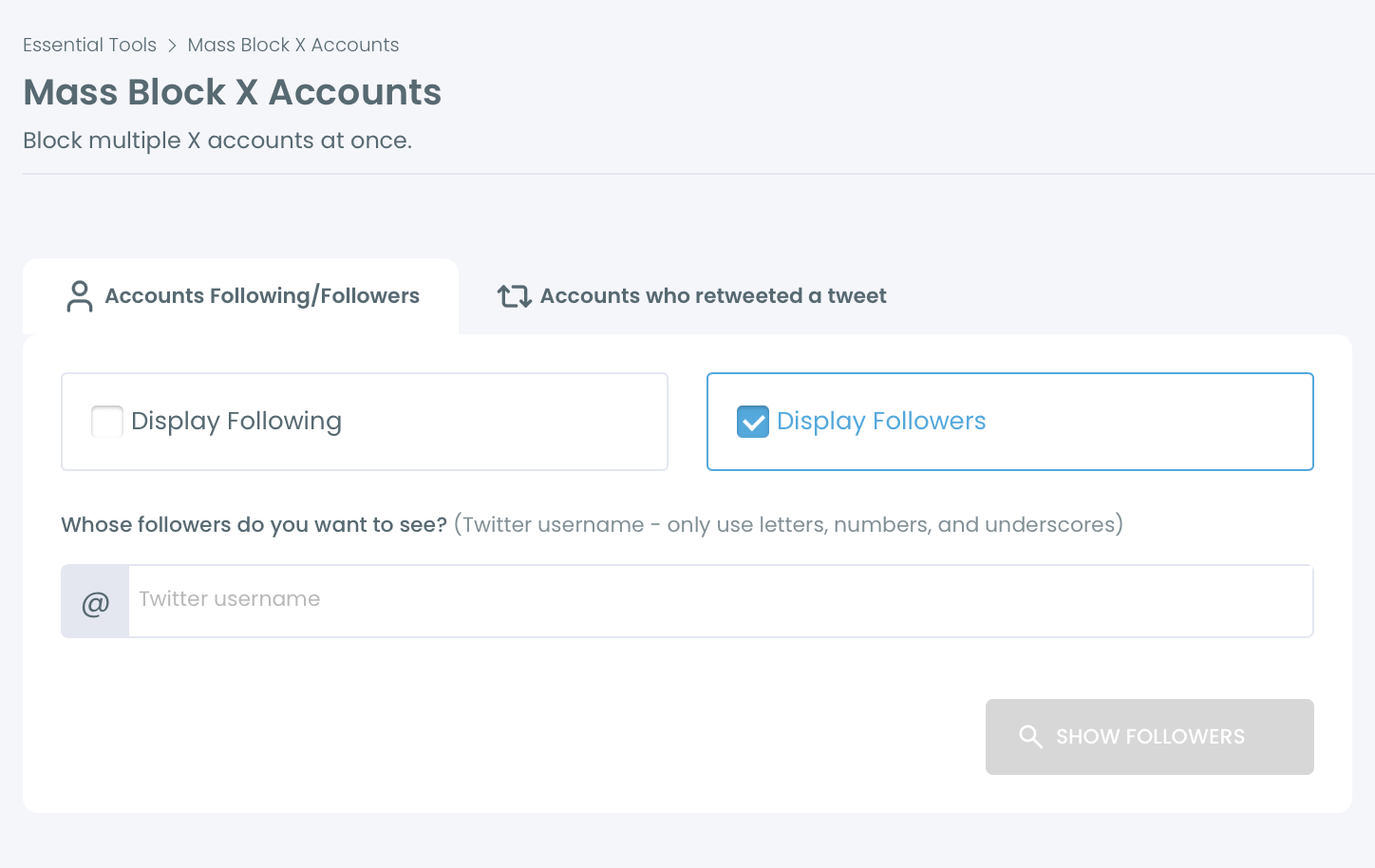
Three facts shape this step:
- The table displays up to 2,500 accounts per search, and sort options bring up more.
- Each search uses one search token.
- The source's followers include legitimate people who simply follow that account.
The third fact is why filters matter most here. As an illustration, filtering the 2,000 followers of a spam account by Fake/Bot and Egghead might leave about 1,400 clear targets, with real-looking accounts left out.
When this rung goes too far
Blocking a source's followers is the widest action on this page, and it is easy to overuse. A large account's followers are mostly bystanders.
I reserve it for sources whose followers show the same pattern again and again: new accounts with no photo and near-identical replies. When the source is simply a person with opinions and a normal audience, the retweeter list is the right boundary and the follower list is not.
This step is the subject of the piece on how to block another user's entire follower list.
Is mass blocking safe for your own X account?
Yes, when the run stays inside X's limits, which is how the extension is built to behave. Blocks are applied gradually and in sequence, not sent as one burst.
Three behaviours keep the account protected:
- The extension pauses on its own when X's block limit is reached, typically for 1 to 20 minutes, then resumes.
- It works through your existing X session and does not ask for your password.
- It skips accounts that are deleted, suspended or already blocked.
Circleboom documents this in its own help article on whether it is safe to use the Twitter (X) Mass Blocker extension.
The risk sits with the user, not the tool. Running several sessions or accounts at once to get around a pause can trigger X's automated restrictions.
Four checks before a large run
Safety also depends on what you confirm before pressing Start. Circleboom's own checklist for strong actions reduces to four checks:
- The Active Filters bar matches the segment you intended.
- The count in the Add to Mass Block List button matches the volume you expected.
- High-value accounts are whitelisted, so they stay out of the selection.
- The list is exported when you need a record of who was chosen.
The queue shown before the extension runs is the last point where the selection can be changed without an unblock afterwards.
What a large run changes on your side
A large run changes three things on your account. Your block list on X grows by every processed account, your follower count falls by each blocked account that followed you, and the browser has to stay open until the run ends.
Closing Chrome or the extension stops the process. For runs across a whole follower base, see how to bulk block Twitter (X) followers.
Which route fits your situation on X
Pick the route by what the accounts did, not by how many there are:
- If they are only noisy, mute them.
- If they follow you and add nothing, remove them.
- If you cannot tell, blacklist or export the list and review it.
- If they spread abuse or a scam, filter the list and block retweeters you have confirmed.
- If the source keeps sending new accounts, filter its followers and block that set.
If a block turns out to be wrong, it can be reversed from the Accounts I've Blocked / Unblock view. The steps to find your blocked list on Twitter and unblock in bulk cover that case.
For the fourth branch, the starting point is one tweet URL.
→ Bulk block a tweet's retweeters on X
What people ask about blocking retweeters in bulk
Should you block every retweeter, or only the bots and obvious bad actors?
Block only the accounts you can justify. I filter by Fake/Bot, Eggheads and recent Join Date, sample the result, and leave out everyone else. Circleboom's own guidance is not to block every retweeter automatically when a tweet reached a mixed audience.
How long does a bulk block of a few hundred accounts take?
Plan for roughly an hour. Circleboom's help page on the time it takes to block users gives an average of about 10 accounts per minute on Twitter (X). At that rate 500 accounts need around 50 minutes of processing, plus any pauses at X's block limit.