Can you add music to a scheduled Instagram post? Yes when the post is a Reel or a Story, no when it is a feed photo or a carousel.
Can you add music to a scheduled Instagram post? Scheduling does not strip the sound layer from Reels and Stories. Circleboom Publish attaches a track from its built-in music library to scheduled Instagram Reels and Stories, filtered by genre, tempo and mood, while feed photos and carousels go out without one. Songs from Instagram's own audio library are a separate step inside the Instagram app.
→ Schedule Instagram posts with music
The matrix below sorts every post type into works and does not work.
What works and what doesn't: music by Instagram post type
Music on a scheduled Instagram post depends on the post type you pick in the composer, not on the fact that it is scheduled. Circleboom Publish splits Instagram into five tabs, and the Add Music button appears on two of them.
| Post type (composer tab) | Track from Add Music | Track travels when cross-posted | What to know |
|---|---|---|---|
| Reels | Works | Works, to Facebook, TikTok and YouTube Shorts | Opens the Create Reels Post window |
| Story Post | Works | Not applicable, Stories stay on Instagram | One image or one video per Story |
| Instagram Post (photo or carousel of up to 10 items) | Does not work | Not applicable | No Add Music on this tab |
| Grid Post | Does not work | Not applicable | Splits one image into tiles |
| Panoramic Post | Does not work | Not applicable | One wide image as a swipeable carousel |
The rule in one line: if it needs a song, make it a Reel or a Story.
A scheduled feed photo or carousel cannot carry a track in Circleboom Publish, so planning a scored moment starts with choosing a video format. For a teaser that should feel lively, cut a short clip rather than a slide set.
Turning a quiet idea into a format that takes a song
Most content plans sort themselves once the matrix is clear. A post that should be studied, like a menu, a price list or a step-by-step tip, works as a carousel and does not need sound. A post that should be felt, like a product reveal, an unboxing or a behind-the-scenes moment, works as a Reel or a Story and should carry a track.
When an idea sits in between, film it. A five-second pan across a product can go out as a Reel with music, while the detailed version runs as a carousel later in the week.
Sound is a format decision you make at the shoot, not at the schedule.
The same library also reaches beyond Instagram. Add Music works for video on Facebook, YouTube Shorts and TikTok, and for Stories on Instagram and Facebook, which is useful if you are also scheduling Reels on Facebook from the same account set.
Why a silent scheduled Reel underperforms
A Reel without sound asks the viewer to supply the mood on their own.
Sound is core to how short video performs. A clip with the right track attached is far more likely to hold attention to the end than a silent one. Viewers who stay longer and engage more are what the Instagram algorithm reads as a reason to recommend a Reel to more people.
That is why the "schedule means silent" assumption is expensive. Batching saves hours, but if it removes the sound layer, it quietly costs reach on every clip in the batch.
The fix is to choose the track inside the scheduler instead of skipping it. That is the whole point of being able to add music to a scheduled Instagram post rather than posting live just to get a song on it.

A track turns a clip people scroll past into one they finish.
Instagram's own limit on full-length tracks
There is a performance limit worth knowing too. Instagram's own guidance on how to use music in your videos says the more full-length recorded tracks a video uses, the more likely it is to be limited, recommends shorter clips, and expects a visual component every time. A library track behind a strong visual fits that guidance; a whole song over a still frame does not.
Watch time is one lever among several. If your Reels stall even with sound, the playbook for getting more views on Instagram Reels covers the levers beyond music.
How the built-in library attaches a track in Circleboom Publish
Circleboom Publish adds music to scheduled Instagram Reels from an Add Music button inside the Create Reels Post window. You open Circleboom Publish, choose the Instagram composer's Reels tab, upload the clip, and Add Music is waiting in the same window.
The library works like this:
- Filters for Genre, Tempo and Mood narrow the track list.
- A keyword search finds a track by name.
- A play button previews each track before you commit.
- A plus button attaches the chosen track to the Reel.
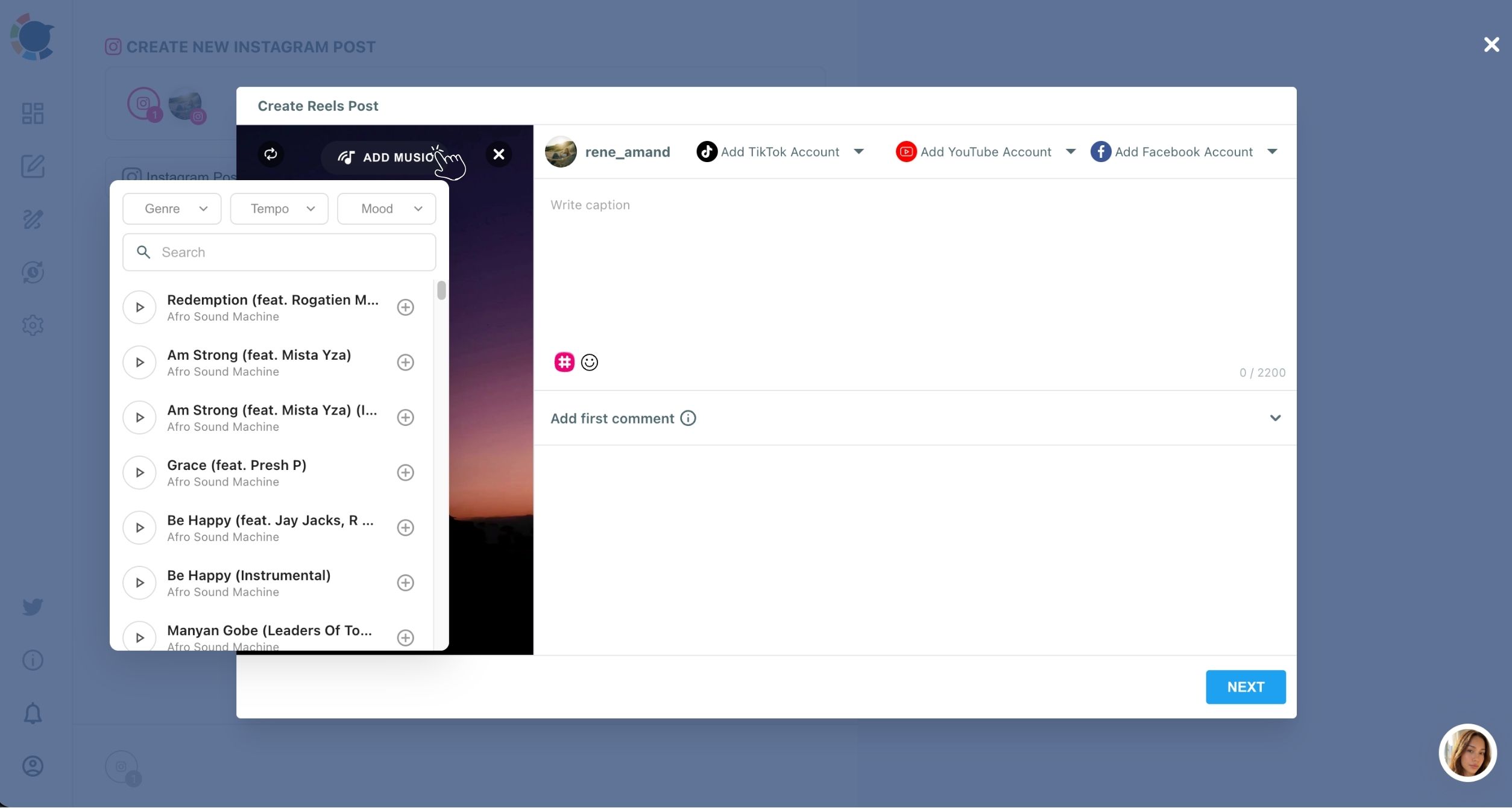
The track is attached in the composer and goes out with the scheduled Reel. Caption, hashtags, the first comment and the publishing time are handled in the same window, so the sound decision is made while the clip is still on screen.
The mood filter does most of the work in practice. A real estate agent's house tour suits a warm, mid-tempo track; a florist's bouquet clip suits something brighter; a yoga studio's morning Reel suits something calm. Matching the track to the clip's concept is what makes the sound feel chosen rather than added.
A scored week in practice
Take a holiday week as an illustration. Film five Reels on Monday, open each one in the Create Reels Post window, add a track to each, and schedule them for the account's best times through Friday.
The music decision happens five times in one sitting, with every clip side by side, instead of five separate live sessions spread over the week. That also makes the tracks consistent: a run of Reels that share a mood reads as one campaign rather than five unrelated posts.
I find that consistency is the part people notice first. A holiday run scored in one sitting sounds planned, because it was.
Where the scheduler sits in the publishing flow
Every scored Reel ends at the same three actions used across Circleboom Publish: Schedule, Post to Queue or Post Now. The Schedule modal suggests best-time slots drawn from the account's own followers, so a scored Reel can land when the audience is online.
Reels scheduling from upload to slot, shown inside Circleboom Publish's Instagram composer.
Before a scored batch goes out, a short check catches most mistakes:
- The post is a Reel or a Story, not a feed photo.
- The track is attached before any cross-post destination is added.
- Each platform gets its own caption, since platforms dislike duplicate content.
- The publishing time is a suggested best-time slot, not a random hour.
When you are ready to run a batch with sound, schedule scored Instagram Reels and Stories from one composer. The dedicated Reels scheduler for Instagram covers the Reel side in more depth.
The Meta route is the other option people weigh. I keep that comparison short and point readers to the breakdown of scheduling Instagram Reels in Meta Business Suite for the details.
Can a scheduled Instagram Story carry music too?
Yes. The Story Post tab in Circleboom Publish has the same Add Music library as Reels, with the same Genre, Tempo and Mood filters and keyword search.
A Story is a format people usually post live from a phone, with Instagram's music sticker. Scheduling removes that live moment, and the built-in library keeps a scheduled Story from losing the sound a live one would have had.
Three differences from Reels matter when you plan:
- A Story takes one image or one video, not a multi-item set.
- A Story stays on Instagram; it does not cross-post like a Reel.
- Music on Stories works for Instagram and Facebook only.
Batching is where this pays off. A café can prepare a week of today's-special Stories on Sunday, each with its own track, instead of stopping service every morning to post one live.
A week of Stories with a track on each can be prepared in one sitting with the Instagram Story scheduler.
On the platform side, Instagram's music guidelines state that there are no limits on music in Stories.
On Facebook, the same composer pattern applies through the Facebook Reels scheduler, so a page manager can keep Reels and Stories scored on both apps.
How long a scored Reel can be when it goes to four platforms
A scored Reel sent to Instagram, Facebook, TikTok and YouTube Shorts in one click has to fit the strictest limit: 60 seconds or less and under 300 MB. YouTube Shorts sets the 60-second ceiling and Instagram the 300 MB one.
The per-platform limits Circleboom works with:
- Instagram video: up to 300 MB.
- Facebook video: up to 10 GB.
- YouTube Shorts: up to 60 seconds.
- TikTok: up to 10 minutes and 4 GB.
A scored 75-second Reel has to lose 15 seconds before a four-platform send.
Trim the scored Reel before the upload
Trim before uploading, not after. If the clip arrives at 75 seconds, YouTube will not take it, and the one-click send stops working. The track is attached in the composer, so cutting the video first means the music is chosen for the final length.
Length also affects how a Reel performs, not just whether it uploads. Circleboom's own testing of Reels lengths put the highest engagement at 15 to 30 seconds, which also sits safely inside the Shorts limit. The reasoning behind that range is in the piece on the best length for Instagram Reels.
Short Reels suit quick tips and fast product showcases; longer ones suit behind-the-scenes stories and demos, and are harder to hold attention through.
Circleboom's help page on video and Reels limitations on Instagram is worth a check before exporting a long clip.
Why Instagram's own songs stay an in-app step
The track on a Reel or Story scheduled in Circleboom Publish comes from Circleboom's built-in library. Songs from Instagram's own audio library are added inside the Instagram app.
Instagram's page on the audio you can add to a reel lists three sources: your original audio, another creator's original audio, or a track from the Instagram audio library added with the Audio tool in Reels. The same page says licensed audio must be attributed, and a track can be muted when agreements with rights holders change, while the post stays viewable.
For a creator, that last point is the one to remember. A muted Reel keeps its views and comments but loses the sound that made it work, so older Reels built on Instagram's own library are worth a periodic look.
Picking licensed audio from Circleboom's built-in library does not change one thing: every published post still lives under Instagram's own audio rules.
Instagram's music stickers are built for live, in-the-moment posting from the app. That live moment is what a scheduler replaces, and the built-in library fills the sound gap it leaves.
When to post from the app instead
So the practical split is simple. When one specific song from Instagram's library is the point of a post, like a trend built around that exact audio, publish that one from the app. For the rest of the week's clips, a library track chosen at scheduling time keeps the batch moving without a single live session.
When reach is the worry, stay with licensed audio from the built-in library, together with a steady posting rhythm and real engagement.
The one rule for music on scheduled Instagram posts
Format decides sound: make it a Reel or a Story, pick the track in the composer, and the schedule carries the song.
→ Score your next scheduled Instagram post
Still Wondering whether your scheduled post can carry a song?
Does the track stay on when the same Reel also goes to Facebook, TikTok and YouTube?
Yes, a track chosen once in the Create Reels Post window travels with the video to every platform it is cross-posted to. Pick the track before adding the destinations so the choice carries across.
Can I add the sound in a video editor before I schedule instead?
Yes, a clip that already carries its own audio can be uploaded and scheduled as it is, since adding music in Circleboom Publish is optional. The built-in library is there for silent clips, so you skip the trip to a separate editor.
Is reposting an older Reel with music a problem?
Reposting the same Reel unchanged reads as duplicate content, so give it a new hook, a new caption and a different track from Add Music. Circleboom's help page on whether you can post duplicate content explains that its duplicate check looks at your posts from the last seven days.
How many scored Reels can one Instagram account post in a day?
Instagram caps an account at roughly 25 posts in 24 hours, and a scheduled Reel counts toward that cap whether or not it carries a track. Spreading a scored batch across several days keeps each day well under it.
Can one scored Reel go to several Facebook Pages or TikTok accounts?
Yes, each destination dropdown in the Create Reels Post window is a checklist, so more than one account per platform can be ticked. In my own batches, that is the step I double-check before pressing Schedule.