

Ready to see who's been quietly leaving?
Circleboom Twitter's Who Unfollowed Me feature tracks every unfollow event on your account, shows you exactly who left and when, and lets you act on it directly from the dashboard.
See Who Unfollowed You →I noticed my follower count had dropped. Not dramatically, just enough to notice. A few people here and there, over the course of a couple of weeks.
Twitter doesn't tell you when someone unfollows you. There's no notification, no alert, no record of it anywhere on the platform. The number just quietly goes down and you're left guessing whether it was one person or twenty, whether it happened yesterday or last week, and whether it had anything to do with something you posted.
I started using Circleboom Twitter to track it properly, and within the first check.
How can I know who has unfollowed me on Twitter?
Twitter does not notify users when someone unfollows them, and there is no native way to see a history of unfollow events on the platform. To know who has unfollowed you on Twitter, you need a third-party tool that tracks your follower list over time and surfaces changes.
➡️ Circleboom Twitter's Who Unfollowed Me feature does exactly that. It monitors your follower list continuously, detects accounts that have stopped following you, and displays them in a structured dashboard with filters by time range, account type, and follower count.
 infocircleboom.com
You can also set up daily or weekly email alerts so you don't have to log in to check manually.
What Is Circleboom Twitter?
Circleboom is an Official X Enterprise Developer, which means it connects to X through official APIs. All the follower tracking it does is based on real data pulled directly from the platform. No scraping, no approximations.

Here's what Circleboom Twitter gives you when it comes to understanding your audience changes:
🟢 See exactly which accounts have unfollowed you and when
🟢 Filter unfollowers by time range, last day, last week, last month
🟢 View full profile details for each unfollower without clicking through separately
🟢 Set daily or weekly email alerts for unfollow activity
🟢 Unfollow accounts back directly from the dashboard in bulk
If you want to know who has unfollowed you on Twitter without manually comparing follower lists, Circleboom Twitter is where that answer is.
How to See Who Unfollowed You on Twitter with Circleboom Twitter
Here’s how it works.
Step#1: As the first step, please go to Circleboom Twitter and login with your active e-mail address.
If you haven't got a Circleboom account yet, you can get one in almost no time!

Step#2: You will see the "Followers" tab on the left. Navigate to it!
Then you will see the "Who Unfollowed Me?" option there.
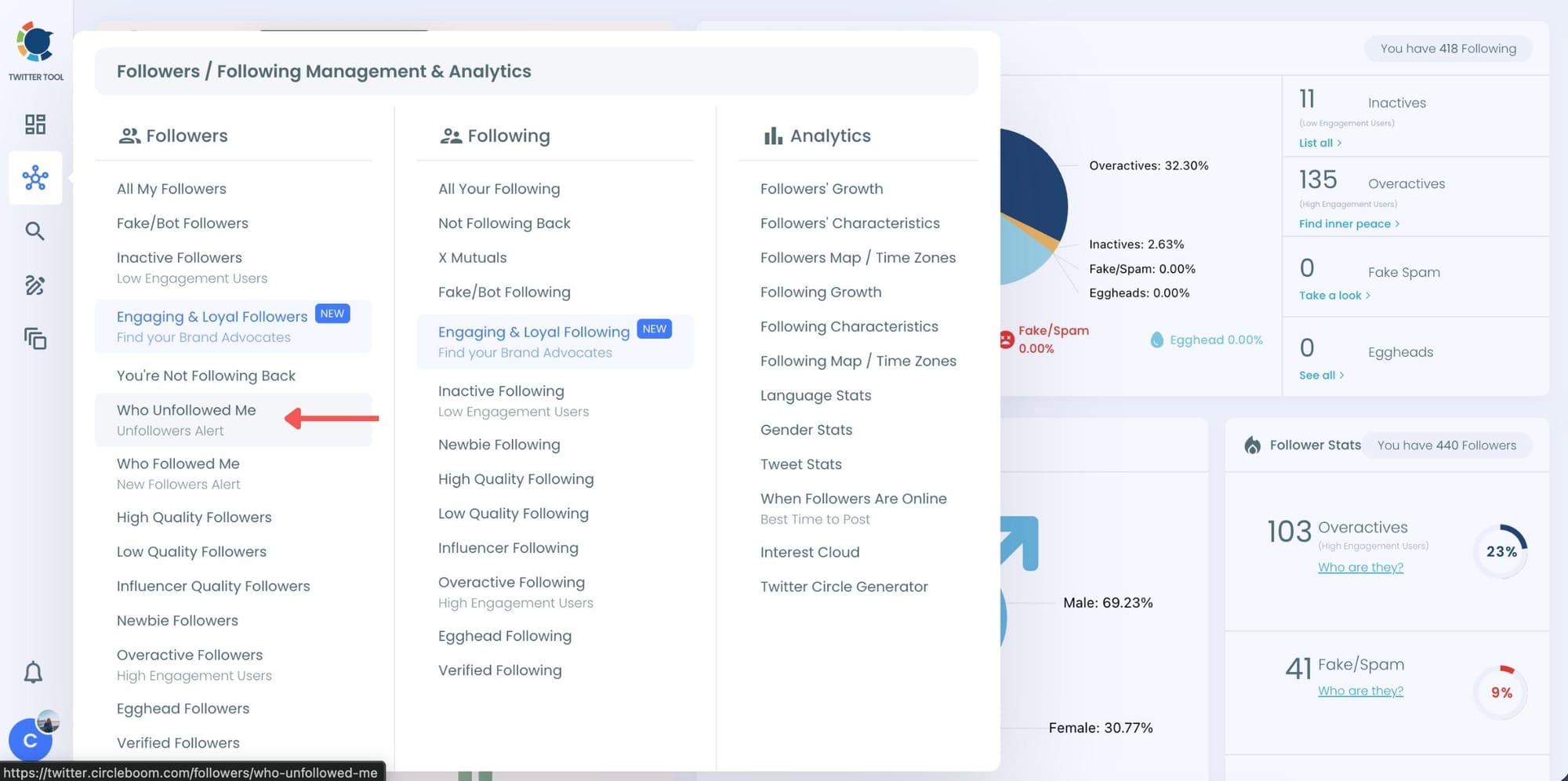
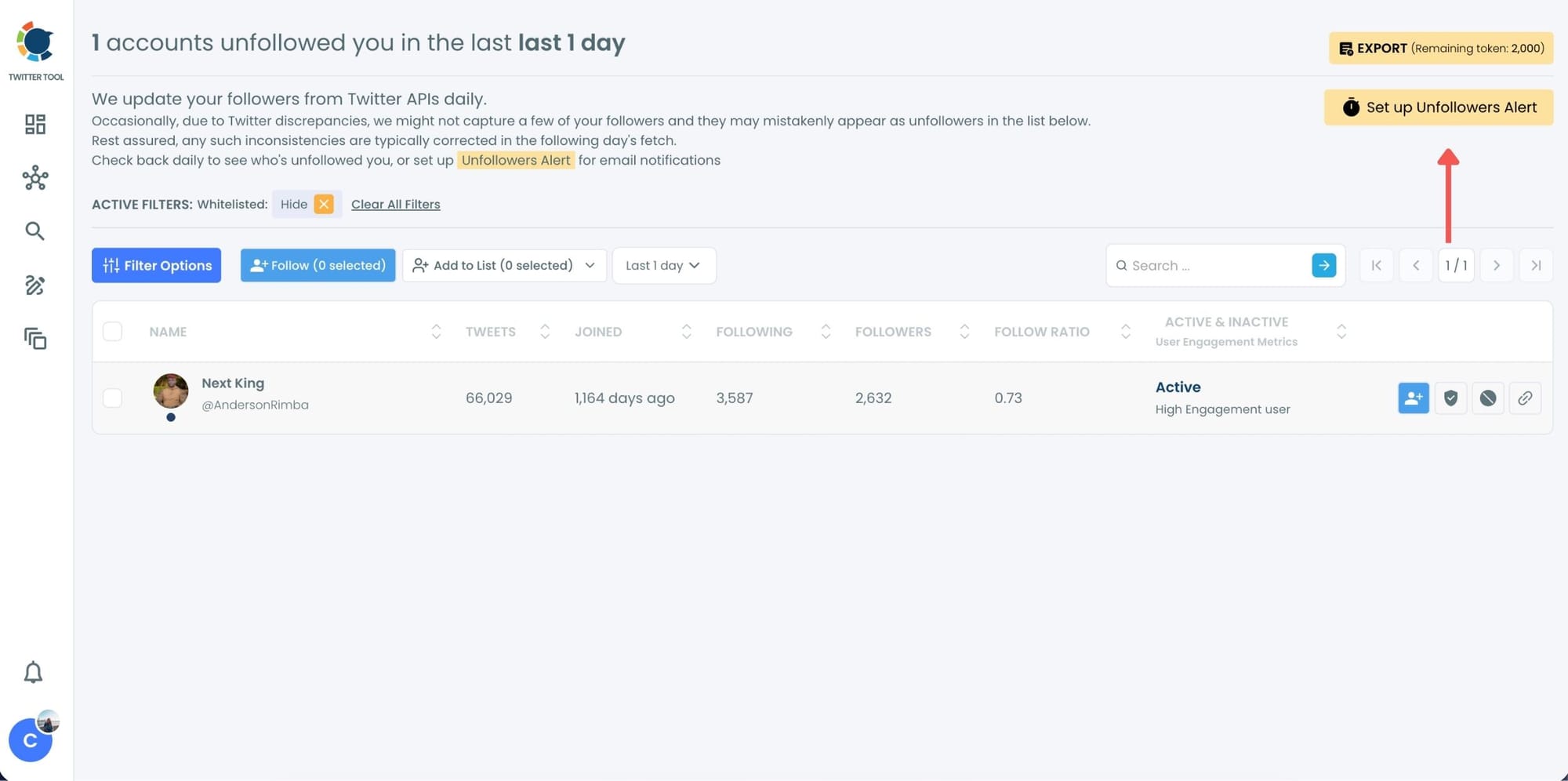
Step #3: You will be able to check your Twitter unfollowers. If you wish, you can visit their Twitter profile and unfollow them!
Here are your Twitter unfollowers identified by Circleboom:
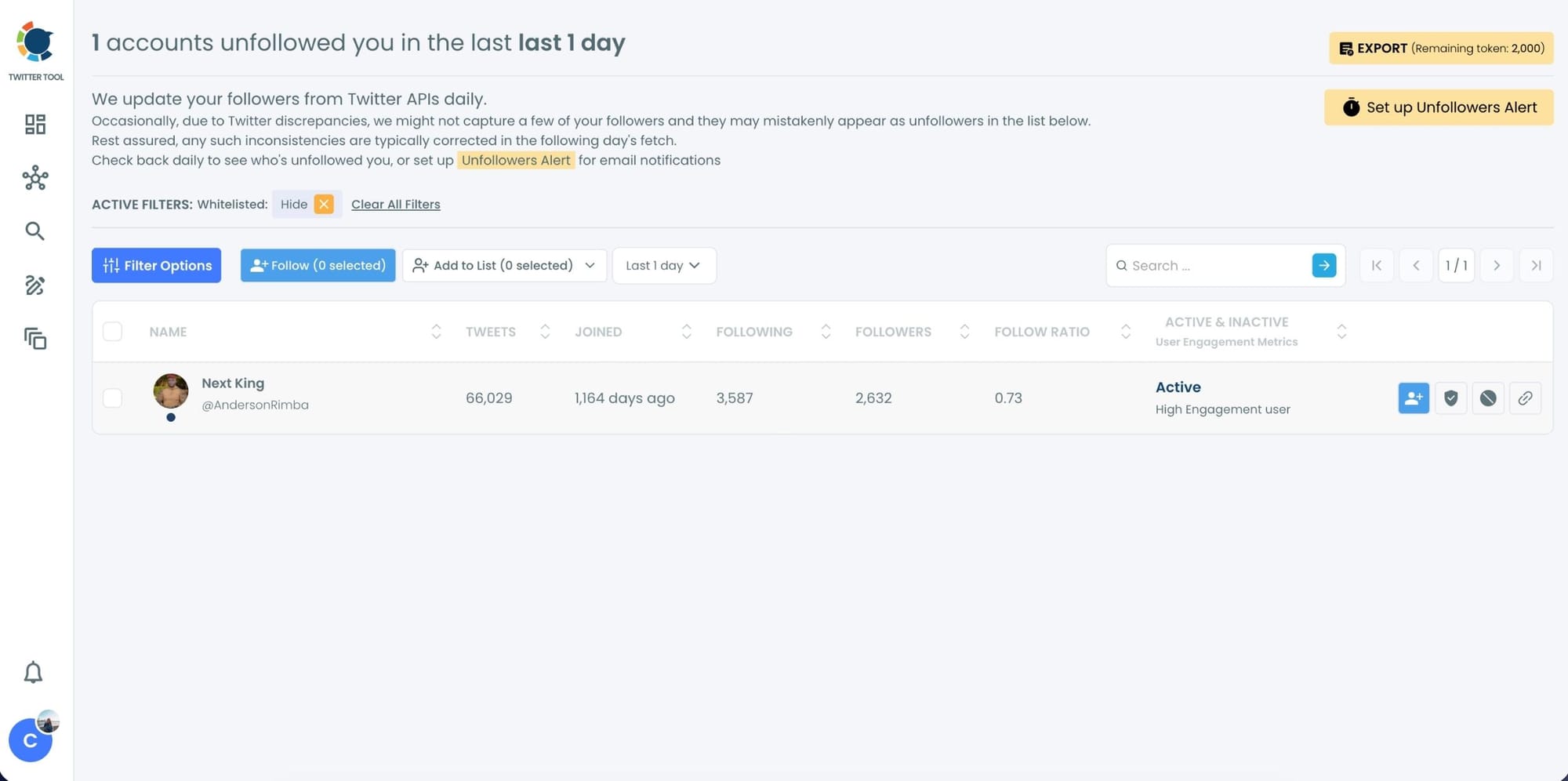
And, you can set up "Unfollowers Alert" to get notified immediately as someone unfollows you on Twitter!
Set Up Unfollower Alerts (Daily or Weekly)
If you don’t want to check manually, Circleboom also offers Unfollower Alerts.
These alerts:
- Track unfollowers automatically
- Send you daily or weekly email reports
- Show exactly who unfollowed you during that period
How to Set Up Alerts:
1. Choose Unfollower Alert
2. Select daily or weekly frequency
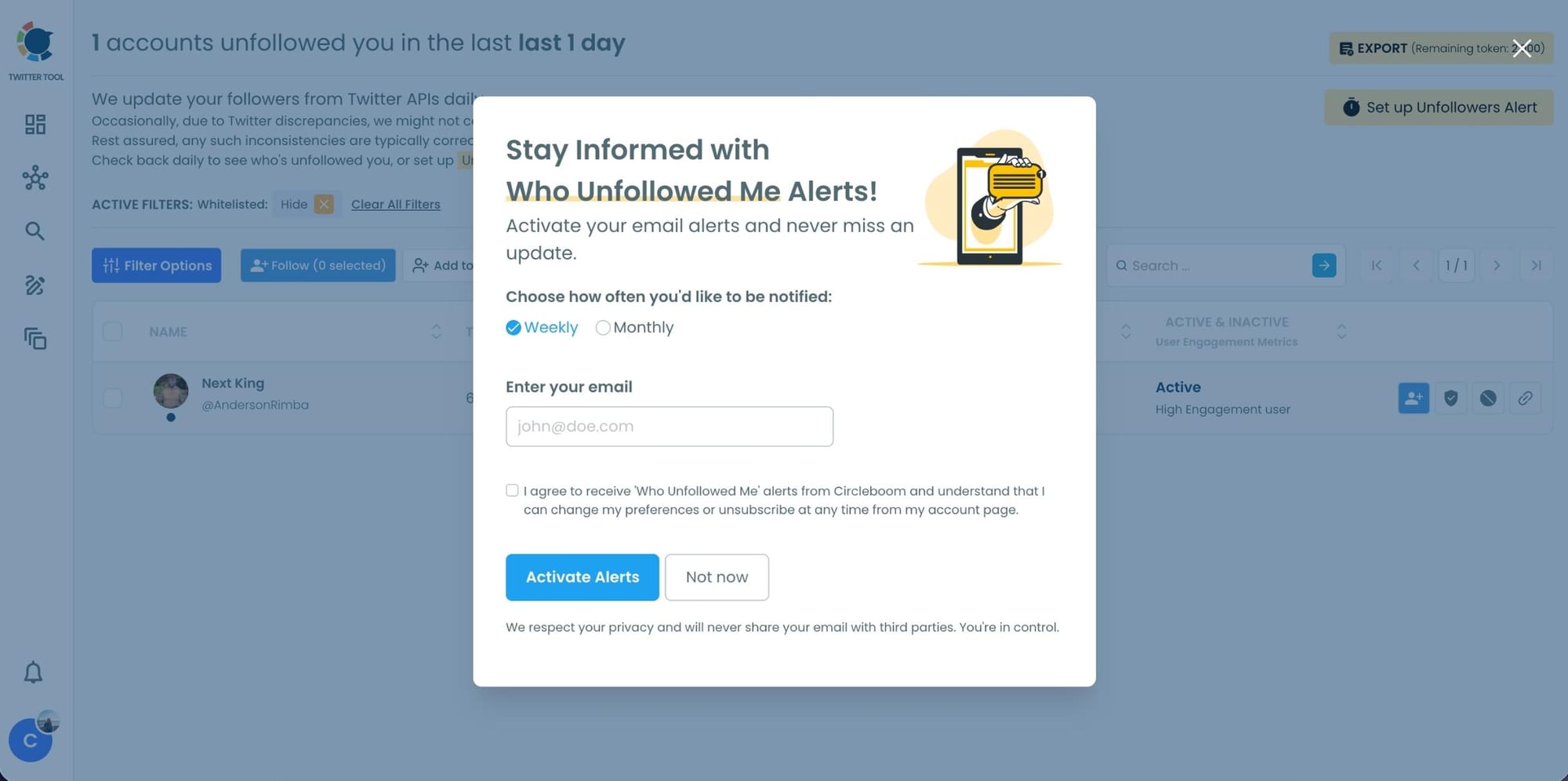
3. Receive email updates without logging in
It turns unfollowers from a surprise into routine data.
What I Actually Found When I Started Tracking
The first thing I noticed was that most of the accounts that had unfollowed me were ones I'd never interacted with. They'd followed at some point, probably from a tweet that surfaced in a mutual's feed, and then left when my regular content didn't match whatever brought them in.
That part wasn't surprising once I saw it. What was more useful was the timing. Circleboom shows you unfollowers filtered by time range, so you can look at the last day, the last three days, the last week, or the last month.
When I filtered to the week I'd posted something more off-topic than usual, the drop was noticeably higher than the weeks around it.
📌 That's the actual value of tracking unfollowers. Not the names. The pattern. A spike in unfollows after a specific post tells you something your like count never will.
Each account in the list comes with full profile data: username, display name, bio, follower count, following count, tweet count, account creation date, and activity indicators. So within a few seconds of looking at an unfollower, I could tell whether it was a real engaged account that chose to leave or a low-activity profile that had probably never read a single tweet.
Most of them were the latter. That matters too, because it means the loss wasn't as meaningful as the raw number made it look.

What to Do Once You Know Who Unfollowed You
Knowing who left is the first step. What you do with that information is where it actually becomes useful.
Unfollow them back if you were following them. One-sided connections clutter your following list and affect your follower-to-following ratio. From Circleboom's dashboard you can unfollow accounts that have left you directly, without going to their profiles individually.
Look at the timing before you react. A handful of unfollows spread across a week is normal turnover. A cluster of unfollows after one specific tweet is a signal worth paying attention to. The time filter in Circleboom's Who Unfollowed Me feature makes that comparison easy.
Don't read too much into individual accounts. Most unfollowers are low-activity profiles, bots that were eventually cleaned up by X, or people who followed during a trending moment and left when the moment passed. The profile data Circleboom shows you helps you tell the difference quickly.
Set up alerts so you don't have to keep checking manually. Circleboom lets you configure daily or weekly email summaries of unfollow activity. Once that's running, you stay informed without logging in just to look at the same dashboard repeatedly.
Frequently Asked Questions
Does Twitter notify you when someone unfollows you?
No. Twitter does not send any notification when someone unfollows your account, and there is no native feature on the platform to track unfollow events or view a history of who has left. The only way to know who unfollowed you on Twitter is to use a third-party tracking tool like Circleboom Twitter, which monitors your follower list over time and surfaces changes in a structured view.
How far back can I see my unfollowers?
Circleboom's Who Unfollowed Me feature tracks changes from the point your account is connected and monitoring begins. It does not retrieve historical unfollow data from before you started tracking. Once connected, you can filter results by the last day, last three days, last week, or last month, and all future unfollow events will be recorded automatically going forward.
Can I unfollow people who unfollowed me directly from Circleboom?
Yes. Once you see your unfollowers list in Circleboom Twitter, you can unfollow accounts back directly from the dashboard without going to each profile individually. This is useful for cleaning up one-sided connections that add no value to your following list and affect your follower-to-following ratio.
Can I get email alerts when someone unfollows me?
Yes. Circleboom Twitter lets you set up daily or weekly email summaries that notify you of unfollow activity without requiring you to log in and check the dashboard manually. You choose the frequency and the alerts arrive automatically when there is activity to report.
Should I be worried if my follower count drops?
Not necessarily. Some follower churn is completely normal on any active account. Accounts get deleted, bots get removed by X, and people who followed during a trending moment naturally drop off. What matters is whether the drops cluster around specific content or time periods, which is where Circleboom's time filter becomes useful. A pattern is meaningful. A handful of individual unfollows usually isn't.
Can I see the profile details of people who unfollowed me?
Yes. Every account in the unfollowers list comes with full profile data including username, display name, bio, follower count, following count, tweet count, account creation date, and activity indicators. This lets you evaluate each unfollower in seconds and decide whether it's worth taking any action.
Final Thoughts
The follower count going down quietly is one of the more frustrating parts of managing an account on X. You see the number, you have no context, and the platform gives you nothing to work with.
I started using Circleboom Twitter because I wanted to stop guessing and start seeing the actual data behind those drops. The list, the timing, the profile details, the ability to unfollow back directly, all of it made the invisible visible in a way that actually changed how I read my own follower count.
If you want to know who has unfollowed you on Twitter, Circleboom Twitter's Who Unfollowed Me feature is the clearest way to find out.
infocircleboom.com

%3F)
