

A draft can look comfortably short and still run over on X, because not every character counts as one. The limit takes a sentence to state; the counting rules are what trip people up.
Short answer: a Twitter post holds up to 280 characters, spaces included, and X Premium raises the Twitter character limit to 25,000 on every tier, Basic included. The catch: X weighs some characters more than others, so under X's character-counting rules any link costs 23 characters and every emoji costs 2, however short they look.
The rest of this page puts every counting rule in one table, shows where Premium's extra room stops, and fits a long draft on X without paying.
How many characters a Twitter post holds, counted the way X counts
Most of what you type costs one character, spaces and line breaks included, but links, emoji and some writing systems follow their own rules, and anything you attach costs nothing. This is how X's developer documentation prices each part of a post against the character limit on X:
| What's in your post | What it costs |
|---|---|
| A letter, number, space or punctuation mark | 1 character |
| A link of any length | 23 characters |
| An emoji, skin tones and joined families included | 2 characters |
| A Chinese, Japanese or Korean character | 2 characters |
| An attached photo, GIF or video | 0 characters |
What links, hashtags and accents cost on X
The link row surprises people most. X wraps every link in its t.co shortener and counts it as 23 characters. Its help center page on posting links adds that this holds even when the link itself is shorter than 23.
A link you cut to 15 characters with another shortener still costs 23, so shortening it first saves nothing on X.
The same page warns that some apps adjust the count as you type and some don't, so an app's running total may not match what X charges once the post goes out.
Hashtags count in full, the # sign included. Accented letters are safe: X normalizes text before counting, so "café" costs four characters however your keyboard builds the é.
Put the rules together and a post fills up faster than it looks. Take one with a link, two emoji and a hashtag: the link and the space before it take 24, the emoji take 4, and the words and hashtag share the remaining 252.
For the character limits on profile fields as well as posts, this rundown of how many characters you can use on Twitter covers both.
Why some scripts and emoji count twice on X
The double weight is how X kept three languages at their old ceiling when Twitter moved everyone else from 140 to 280 characters in 2017.
In its announcement of the 280-character test, the company said Japanese, Korean and Chinese pack about twice as much information into each character. English, Spanish, Portuguese and French don't, so their writers ran out of room far more often.
Its chart put the gap in numbers. Most English posts ran to 34 characters and most Japanese ones to 15, and 9% of English posts hit the old 140-character limit, against 0.4% of Japanese ones.
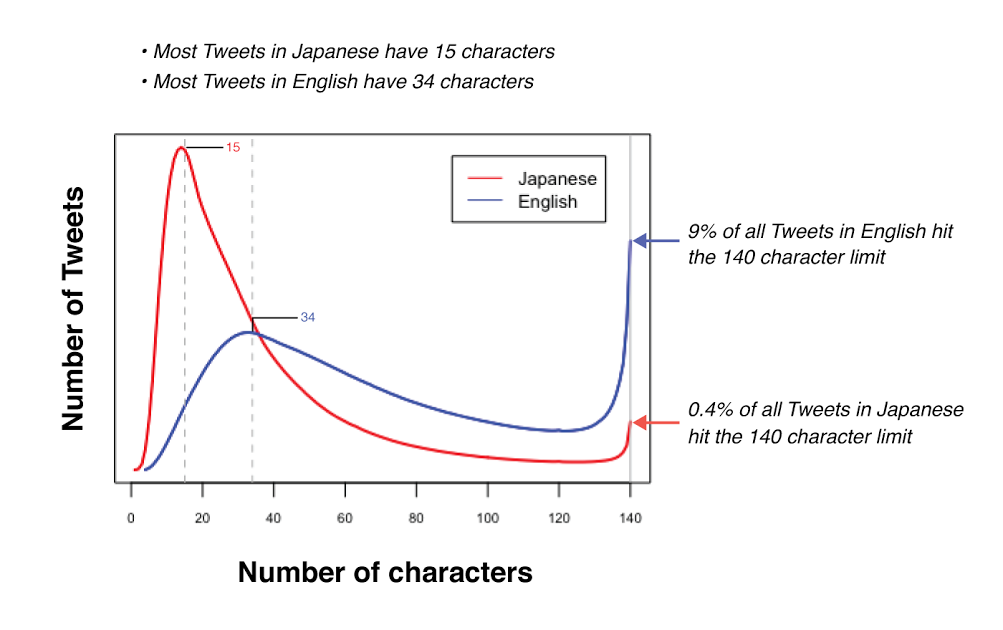
Each character in those three languages counts as two, which leaves room for 140, and at about twice the information per character, 140 of them carry roughly what 280 carry in English.
Emoji have the same weight, and X's documentation adds that a skin-tone emoji, or a family built from several emoji joined together, still counts as a single pair.
Russian, Arabic and Hindi posts still get the full 280 on Twitter
The documentation's summary table blurs one detail. It files "other Unicode" under a default weight of two.
Yet the weight file behind the counting library it recommends gives weight one to the first 4,352 Unicode code points. Those cover Greek, Cyrillic, Hebrew, Arabic, Thai and the main Indian scripts, so a post in Russian, Arabic or Hindi gets the full 280, not 140.
Premium's 25,000-character limit on X, on every tier
Every tier of X Premium raises Twitter's character limit from 280 to 25,000, the cheapest one included. X's help page About X Premium lists longer posts among the features "available to every Premium tier" of its three plans, Basic, Premium and Premium+.
Basic starts at $3 a month or $32 a year on the web, before tax and local pricing.
Long posts work in quotes and replies as well, and they keep the usual extras: media, polls and hashtags. Anyone can read one, but only subscribers can write one.
Subscribers also get bold and italic text, and the composer's progress circle changes at 280, switching from tracing its outline to filling in.
If you've seen 4,000 quoted as the Premium limit, that figure still sits in X's own help center. The iPhone and Android steps on its how-to-post page say "up to 4,000 characters", while the web steps on the same page and the Premium page itself say 25,000.
The Premium page defines the feature, so go by 25,000.
Where a long post on X still stops at 280
Paying moves the limit, but not every rule moves with it.
X lists three that still apply on its help page about the different types of posts:
- An @mention placed past character 280 currently sends no notification to the account you mentioned.
- If replies are limited to the people you mention, only mentions inside the first 280 characters count.
- On the web, a longer post can't be saved as a draft or scheduled.
A long launch post that thanks a partner in its closing lines, for example, won't notify that partner unless the tag moves up.
Writing long? Keep every @mention inside the first 280 characters.
Is it worth paying for longer posts on Twitter?
For most people it isn't, unless long single posts are a weekly habit.
A thread does the same job for free within the standard 280-character limit, and Premium's extra room comes with the three rules above. A quick way to decide:
- You go over 280 a few times a month: split the draft into a thread.
- You write long posts every week and want bold or italic text: the Basic tier's longer posts cover it.
- You mostly share links or images: a link costs 23 on any plan and media costs nothing, so the extra room rarely comes into play.
- You're writing an essay with headings and lists: that's X's Articles format, which X keeps for its higher tiers and business accounts, not Basic.
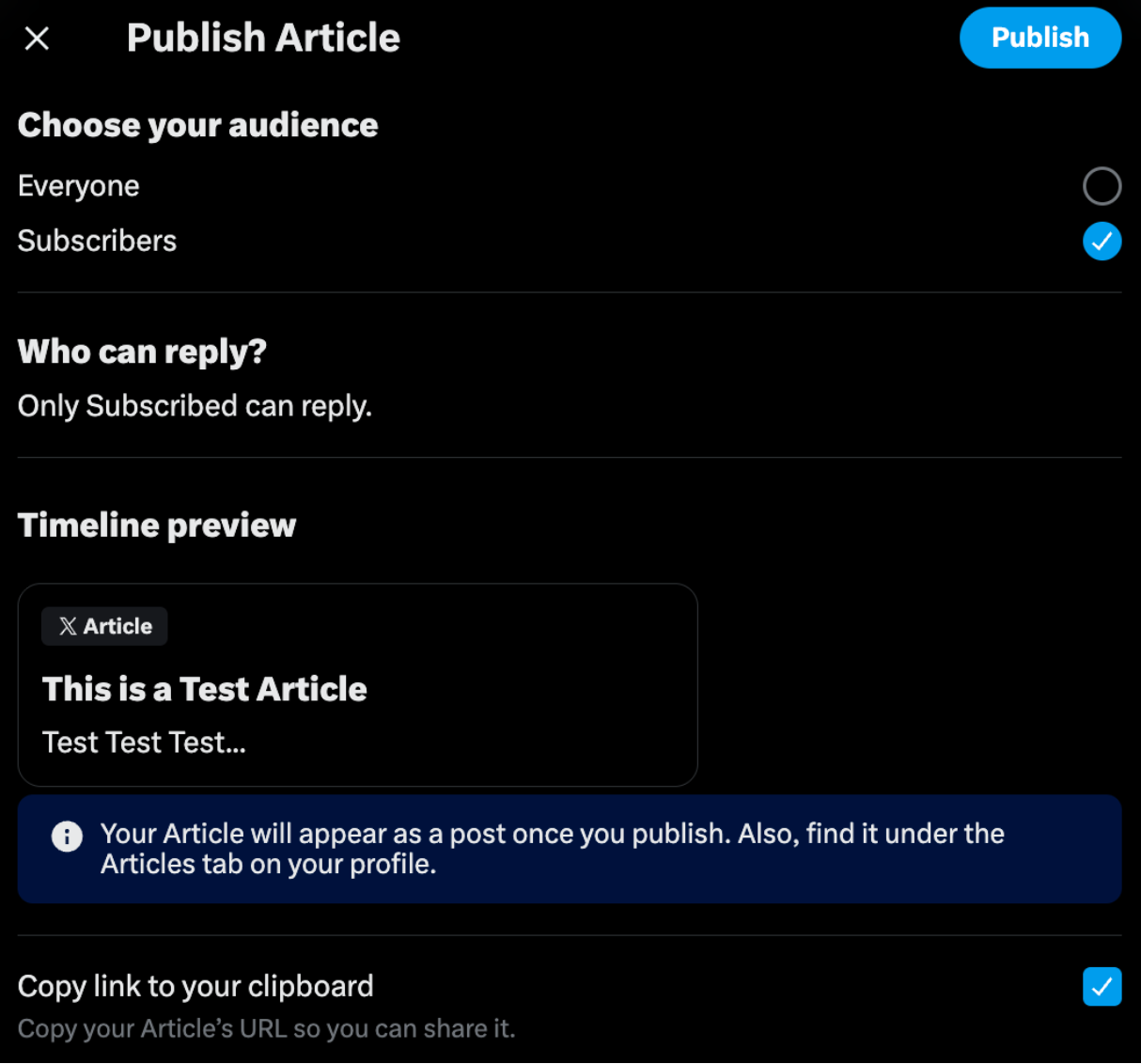
Articles are the step past a long post. X's publish dialog lets you choose who can read one, Everyone or your Subscribers, and previews the card it will show in the timeline; once it's published, it also sits under the Articles tab on your profile.
Premium bundles more than longer posts, from editing published posts to a checkmark on the higher tiers. This look at whether X Premium is worth it walks through the rest of the package.
How a thread carries a long draft on X for free
A thread is X's built-in route past 280 for anyone without Premium: a chain of connected posts from one account, each with its own 280 characters.
In the composer, the plus icon adds the next post once the current one has text, anything over the Twitter character limit is highlighted so you can move it down, and Post all publishes the chain.
You can extend it later with Add another post, an option only the author sees. In the app, pulling down on the compose window also offers Continue Thread, which adds a new post to your last one instead of starting a fresh thread.
How readers meet a thread should shape how you write it. X generally shows a thread of two or three posts in the timeline joined by a line, but from four posts up it trims the run and offers Show this thread instead.
A draft of about 1,000 characters splits into four posts, which is exactly the length where that trimming starts, so the opening post has to earn the tap on its own.
For the other routes past the limit, from Premium to posting your text as an image, see how to tweet more than 280 characters.
Splitting a long draft into a numbered Twitter thread
The composer's buttons are the easy part of a thread. The work is deciding where each post ends:
- every post has to make sense alone in someone's feed;
- each break has to fall between ideas, not mid-sentence;
- a 1/ marker takes characters from every post that carries it.
That's a formatting job more than a writing one, because the ideas are already in your draft.
Circleboom Twitter handles it with Generate a Thread from Text, one of the AI Features in its X AI Writer and Post Analytics menu. You paste the draft, and it splits the text into posts sized for X's character limit, with an opening post and a closing one.

You can set how many posts you want or leave it on automatic, add 1/ numbering and a + or → marker, then edit any post before you publish it, schedule it or save it to Collections.
Under X's weighting the → costs two characters and the + costs one, so on posts that run close to 280, the + is the cheaper marker.
Reviewing the generated thread before it posts on X
The draft lands in the composer, so you can reorder, merge, split or rewrite any post where the tool's break doesn't fit your point.
What comes back tracks what goes in: a draft with the filler cut and its main point stated up front splits more cleanly than a rough one.
Read the result against your draft before it goes out. The generator can compress or reword a sentence, and a draft of one or two sentences is too short to become a thread at all.
Numbering an X thread you write yourself
If you'd rather write each post yourself, Auto Numbering in the X Post Planner's post editor adds the sequence at the start or end of every post. Formats run from #1 and 1/ to 1/10 or 1 of 10, and it can skip the first or last post.
Choose the format with the limit in mind: a short marker like #1 takes two or three characters, 1 of 10 takes six to eight, and each one counts against the 280.
The Twitter Thread Maker page shows the rest of the flow: adding posts, attaching images or video, and posting now or later.
X counts Circleboom among its official Enterprise developers. That means you connect your account on X's own authorization screen instead of typing a password into a third-party form, and nothing is scraped.

Why not just cut your X post down to 280 characters?
Often you should. Trimming is free, and a post that makes its point in 280 characters asks less of the reader.
The mistake I see most often runs the other way: cutting a draft until the step, the number or the source that made it useful is gone.
When the trimmed version loses that, thread it. When long posts are a weekly habit, the Basic tier's extra room is the simpler fix.
Either way, the Twitter character limit decides what fits: 280 characters, 23 for any link, 2 for each emoji, and every @mention inside the first 280, even when Premium gives you more room.
→ Turn your next long draft into a Twitter thread
Twitter character limit questions about words, replies and bios
Is there a word limit on Twitter, or only a character limit?
X's character limit counts characters, not words, so there's no word cap as such. As a rough illustration, if an English word averages five or six characters with the space after it, 280 characters holds somewhere around 45 to 55 words.
Do the @usernames in a reply count toward the limit?
Not the ones X fills in for you. X's documentation says the @usernames added automatically at the start of a reply don't count, while any @username you type yourself counts like the rest of your text.
Do verified or business accounts on X get a higher limit?
Only through the subscription behind the badge. X's Premium page says a blue checkmark now means an active Premium subscription, which brings 25,000-character posts, and that Premium Business and Premium Organizations accounts, along with their affiliates, get Premium+ included.
How many characters can a Twitter bio, name or username have?
A bio holds up to 160 characters, a display name up to 50 and a username up to 15, according to X's help pages on editing a profile and on username rules.



%3F)